<?xml version="1.0" encoding="utf-8"?><feed xmlns="http://www.w3.org/2005/Atom" ><generator uri="https://jekyllrb.com/" version="4.2.2">Jekyll</generator><link href="https://abdulowork.github.io/feed.xml" rel="self" type="application/atom+xml" /><link href="https://abdulowork.github.io/" rel="alternate" type="text/html" /><updated>2023-03-08T06:56:35+00:00</updated><id>https://abdulowork.github.io/feed.xml</id><title type="html">Through the wilds of 🍏 dev</title><subtitle>Writing about the experience with Apple development tools</subtitle><author><name>Timofey Solonin</name><email>abdulowork@gmail.com</email></author><entry><title type="html">Debugging lldb Scripts in PyCharm</title><link href="https://abdulowork.github.io/Debugging-lldb-Scripts-in-PyCharm/" rel="alternate" type="text/html" title="Debugging lldb Scripts in PyCharm" /><published>2023-03-07T00:00:00+00:00</published><updated>2023-03-07T00:00:00+00:00</updated><id>https://abdulowork.github.io/Debugging-lldb-Scripts-in-PyCharm</id><content type="html" xml:base="https://abdulowork.github.io/Debugging-lldb-Scripts-in-PyCharm/"><![CDATA[<p><img src="/assets/3/title_updated.png" alt="title" /></p>

<p>Debugging in <code class="language-plaintext highlighter-rouge">lldb</code> can be great. But sometimes, running commands manually becomes tedious. Fortunately, <code class="language-plaintext highlighter-rouge">lldb</code> provides a way to automate any action: <strong>Python scripts!</strong></p>

<p>However, writing <code class="language-plaintext highlighter-rouge">Python</code> scripts without IDE support and a debugger is beneath any developer’s dignity. In this tutorial, I will show you how to set up <code class="language-plaintext highlighter-rouge">PyCharm</code> to take your <code class="language-plaintext highlighter-rouge">lldb</code> scripting experience to the next level. There will be:</p>

<ul>
  <li><code class="language-plaintext highlighter-rouge">Python</code> and <code class="language-plaintext highlighter-rouge">PyCharm</code> setup for <code class="language-plaintext highlighter-rouge">lldb</code> scripting</li>
  <li><code class="language-plaintext highlighter-rouge">PyCharm</code> fix for process attachment on an <code class="language-plaintext highlighter-rouge">arm64</code> macOS</li>
  <li><code class="language-plaintext highlighter-rouge">Python</code> modules injection for IDE and runtime support</li>
  <li>Debugging breakpoints and commands in <code class="language-plaintext highlighter-rouge">PyCharm</code></li>
</ul>

<!--more-->

<h2 id="setting-up-pycharm">
<a href="#setting-up-pycharm" class="heading-link">
Setting up PyCharm
</a>
</h2>

<p>Let’s start by creating a directory for the project:</p>

<div class="language-bash highlighter-rouge"><div class="highlight"><pre class="highlight"><code><span class="nv">$ </span><span class="nb">mkdir </span>lldb_scripts <span class="o">&amp;&amp;</span> <span class="nb">cd </span>lldb_scripts
</code></pre></div></div>

<p>Now we need a python environment. Create a virtual environment from the Xcode’s embedded Python used by the lldb:</p>

<div class="language-bash highlighter-rouge"><div class="highlight"><pre class="highlight"><code><span class="nv">$ </span>sh <span class="nt">-c</span> <span class="s1">'exec "$(xcode-select -p)"/Library/Frameworks/Python3.framework/Versions/Current/bin/python3 -m venv python_env'</span>
</code></pre></div></div>

<p>We also need lldb’s initialization file, so might as well link it to the project:</p>

<div class="language-bash highlighter-rouge"><div class="highlight"><pre class="highlight"><code><span class="nv">$ </span><span class="nb">touch</span> ~/.lldbinit <span class="o">&amp;&amp;</span> <span class="nb">ln</span> <span class="nt">-s</span> ~/.lldbinit lldbinit
</code></pre></div></div>

<p>Open the project in PyCharm. I am on a community edition:</p>

<div class="language-bash highlighter-rouge"><div class="highlight"><pre class="highlight"><code><span class="nv">$ </span>open <span class="nt">-a</span> <span class="s2">"PyCharm CE"</span> <span class="nb">.</span>
</code></pre></div></div>

<p>Go to project settings and make sure the project picked up the correct virtual environment from the <code class="language-plaintext highlighter-rouge">python_env</code> directory:</p>

<p><img src="/assets/3/pycharm_environment.png" alt="pycharm_environment" /></p>

<h2 id="script-to-debug">
<a href="#script-to-debug" class="heading-link">
Script to debug
</a>
</h2>

<p>Now we need a script to debug. Make a <code class="language-plaintext highlighter-rouge">test.py</code> file with the following contents:</p>

<div class="language-python highlighter-rouge"><div class="highlight"><pre class="highlight"><code><span class="kn">import</span> <span class="nn">os</span>  
<span class="kn">import</span> <span class="nn">time</span>  
  
<span class="k">def</span> <span class="nf">test_loop</span><span class="p">(</span><span class="n">debugger</span><span class="p">,</span> <span class="n">command</span><span class="p">,</span> <span class="n">result</span><span class="p">,</span> <span class="nb">dict</span><span class="p">):</span>  
    <span class="k">print</span><span class="p">(</span><span class="sa">f</span><span class="s">'lldb pid is: </span><span class="si">{</span><span class="n">os</span><span class="p">.</span><span class="n">getpid</span><span class="p">()</span><span class="si">}</span><span class="s">'</span><span class="p">)</span>  
    <span class="k">while</span> <span class="bp">True</span><span class="p">:</span>  
        <span class="n">time</span><span class="p">.</span><span class="n">sleep</span><span class="p">(</span><span class="mi">3</span><span class="p">)</span>  
        <span class="k">print</span><span class="p">(</span><span class="sa">f</span><span class="s">'The time is: </span><span class="si">{</span><span class="n">time</span><span class="p">.</span><span class="n">time</span><span class="p">()</span><span class="si">}</span><span class="s">'</span><span class="p">)</span>  
  
<span class="k">def</span> <span class="nf">__lldb_init_module</span><span class="p">(</span><span class="n">debugger</span><span class="p">,</span> <span class="nb">dict</span><span class="p">):</span>  
    <span class="n">module</span> <span class="o">=</span> <span class="n">os</span><span class="p">.</span><span class="n">path</span><span class="p">.</span><span class="n">splitext</span><span class="p">(</span><span class="n">os</span><span class="p">.</span><span class="n">path</span><span class="p">.</span><span class="n">basename</span><span class="p">(</span><span class="n">__file__</span><span class="p">))[</span><span class="mi">0</span><span class="p">]</span>  
    <span class="n">function</span> <span class="o">=</span> <span class="n">test_loop</span><span class="p">.</span><span class="n">__name__</span>  
    <span class="k">print</span><span class="p">(</span><span class="sa">f</span><span class="s">'</span><span class="se">\n</span><span class="s">Registering </span><span class="si">{</span><span class="n">module</span><span class="si">}</span><span class="s">.</span><span class="si">{</span><span class="n">function</span><span class="si">}</span><span class="s">. Call "</span><span class="si">{</span><span class="n">function</span><span class="si">}</span><span class="s">" from lldb to run the script'</span><span class="p">)</span>  
    <span class="n">debugger</span><span class="p">.</span><span class="n">HandleCommand</span><span class="p">(</span><span class="sa">f</span><span class="s">'command script add -f </span><span class="si">{</span><span class="n">module</span><span class="si">}</span><span class="s">.</span><span class="si">{</span><span class="n">function</span><span class="si">}</span><span class="s"> </span><span class="si">{</span><span class="n">function</span><span class="si">}</span><span class="s">'</span><span class="p">)</span>
    <span class="k">print</span><span class="p">(</span><span class="sa">f</span><span class="s">'</span><span class="se">\n</span><span class="s">Attach to lldb at: </span><span class="si">{</span><span class="n">os</span><span class="p">.</span><span class="n">getpid</span><span class="p">()</span><span class="si">}</span><span class="s">'</span><span class="p">)</span>
</code></pre></div></div>

<p>And add the script import to the <code class="language-plaintext highlighter-rouge">.lldbinit</code> file:</p>

<div class="language-plaintext highlighter-rouge"><div class="highlight"><pre class="highlight"><code>command script import ~/lldb_scripts/test.py
</code></pre></div></div>

<p>The script is pretty simple:</p>
<ol>
  <li><code class="language-plaintext highlighter-rouge">__lldb_init_module</code> function is called when lldb is loaded</li>
  <li>The function registers the <code class="language-plaintext highlighter-rouge">test_loop</code> command in lldb</li>
  <li>Calling <code class="language-plaintext highlighter-rouge">test_loop</code> prints lldb’s pid and spins in an eternal loop printing time every 3 seconds</li>
</ol>

<p>Start <code class="language-plaintext highlighter-rouge">lldb</code> and call the <code class="language-plaintext highlighter-rouge">test_loop</code>:</p>

<div class="language-bash highlighter-rouge"><div class="highlight"><pre class="highlight"><code><span class="nv">$ </span>lldb <span class="nt">-o</span> test_loop
</code></pre></div></div>

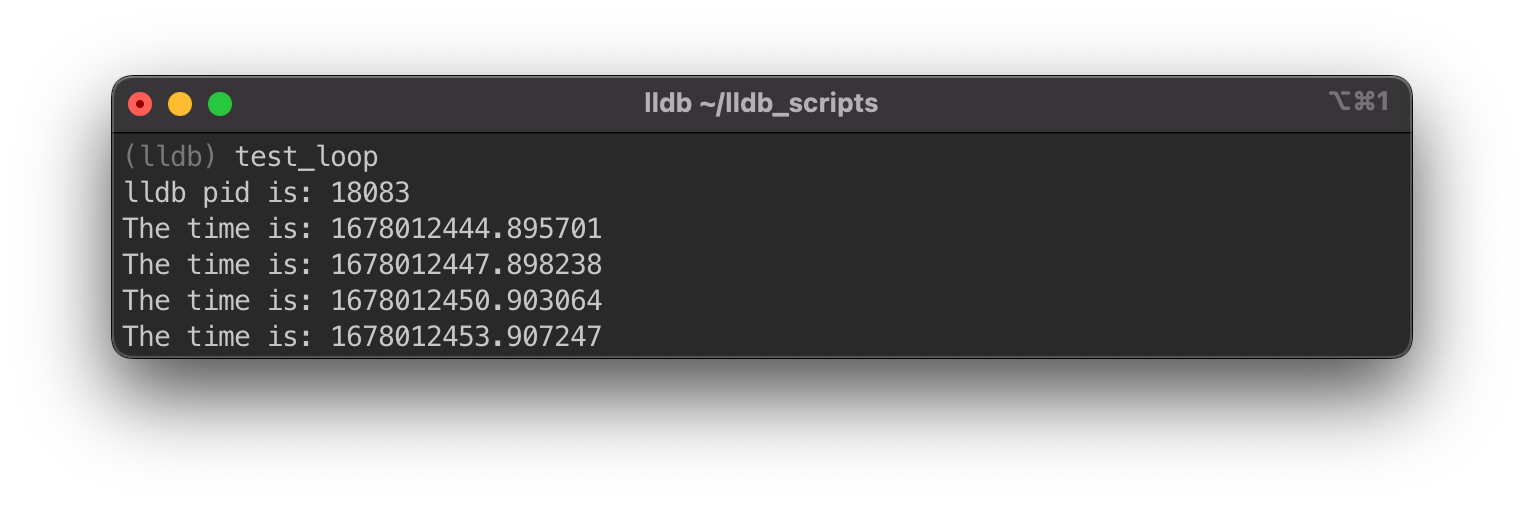
<p>Hopefully, this is your output:</p>

<p><img src="/assets/3/lldb_output_1.png" alt="lldb_output_1" /></p>

<h2 id="attaching-pycharm-to-the-script">
<a href="#attaching-pycharm-to-the-script" class="heading-link">
Attaching PyCharm to the script
</a>
</h2>

<p>As always, things aren’t as simple as just running <code class="language-plaintext highlighter-rouge">Attach To Process</code> in PyCharm. <code class="language-plaintext highlighter-rouge">lldb</code> is signed to run with a hardened runtime, which means PyCharm won’t be able to attach. We need a copy of <code class="language-plaintext highlighter-rouge">lldb</code> with a stripped-down signature to bypass this restriction. Let’s make one:</p>

<div class="language-bash highlighter-rouge"><div class="highlight"><pre class="highlight"><code><span class="nv">$ </span><span class="nb">cp</span> <span class="s2">"</span><span class="si">$(</span>xcrun <span class="nt">-f</span> lldb<span class="si">)</span><span class="s2">"</span> unsigned_lldb <span class="o">&amp;&amp;</span> codesign <span class="nt">--force</span> <span class="nt">--sign</span> - unsigned_lldb
</code></pre></div></div>

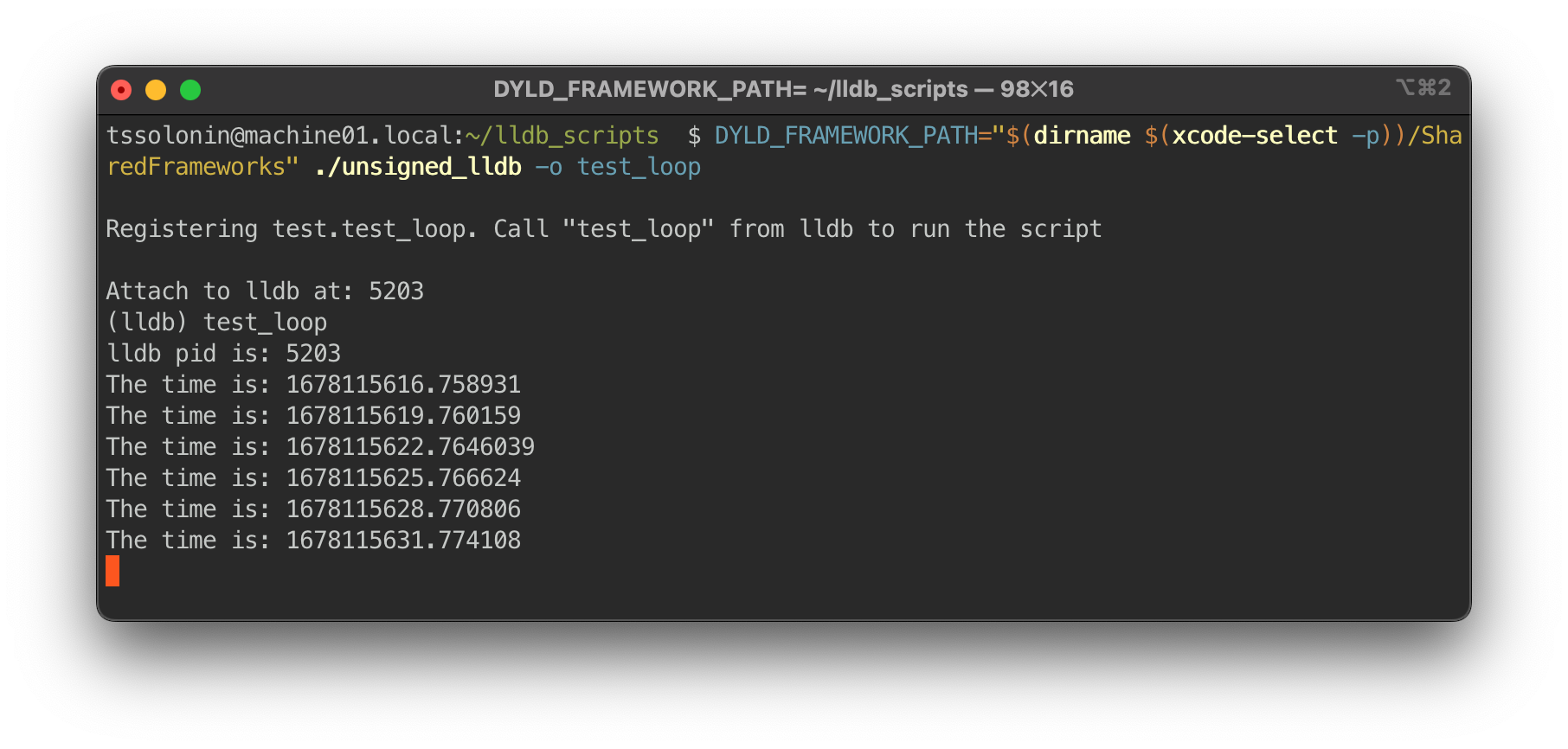
<p>If you made the copy outside the Xcode’s <code class="language-plaintext highlighter-rouge">bin</code> directory, the rpath would be incorrect. To run this <code class="language-plaintext highlighter-rouge">lldb</code>, we must specify rpath explicitly. Run <code class="language-plaintext highlighter-rouge">lldb</code> again using:</p>

<div class="language-bash highlighter-rouge"><div class="highlight"><pre class="highlight"><code><span class="nv">$ DYLD_FRAMEWORK_PATH</span><span class="o">=</span><span class="s2">"</span><span class="si">$(</span><span class="nb">dirname</span> <span class="si">$(</span>xcode-select <span class="nt">-p</span><span class="si">))</span><span class="s2">/SharedFrameworks"</span> ./unsigned_lldb <span class="nt">-o</span> test_loop
</code></pre></div></div>

<p><img src="/assets/3/lldb_output_2.png" alt="lldb_output_2" /></p>

<p>To attach PyCharm, go to <code class="language-plaintext highlighter-rouge">Run -&gt; Attach To Process...</code> and select the pid of the lldb process (i.e., <code class="language-plaintext highlighter-rouge">5203</code> from the output above).</p>

<p>If PyCharm doesn’t show any processes go to <code class="language-plaintext highlighter-rouge">PyCharm -&gt; Preferences... -&gt; Build, Execution, Deployment -&gt; Python Debugger</code> and set the <code class="language-plaintext highlighter-rouge">Attach To Process</code> filter string to empty so that all processes are displayed.</p>

<p>On an Intel machine (or an <code class="language-plaintext highlighter-rouge">arch -x86_64 lldb</code>) PyCharm should attach and start outputting the timer in the debugger console. But many of us no longer work on Intel machines; on an arm machine, PyCharm will fail to attach.</p>

<h2 id="fixing-a-broken-arm">
<a href="#fixing-a-broken-arm" class="heading-link">
Fixing a broken arm
</a>
</h2>

<p>Attaching to arm targets, as of PyCharm 2022.3.2, <a href="https://youtrack.jetbrains.com/issue/PY-51483/Python-debugger-fails-to-launch-on-Mac-M1-Monterey-for-FastAPI-project-with-pyenv-interpreter#focus=Comments-27-6474114.0-0">isn’t supported</a> out of the box. Fortunately, the issue is <a href="https://github.com/fabioz/PyDev.Debugger/pull/201">relatively easy to workaround</a>.</p>

<p>When PyCharm connects to a process, it injects and calls a library with a C function that links the debugger to the debuggee. PyCharm bundles only the x86_64 version of that library and, on attachment, futilely tries to inject the library into an arm process.</p>

<p>To fix the attachment process, we need to compile the library to run on arm and preload it into <code class="language-plaintext highlighter-rouge">lldb</code> before PyCharm tries to call the C function from the library. The sources for the library are shipped with PyCharm and can be found in:</p>

<div class="language-bash highlighter-rouge"><div class="highlight"><pre class="highlight"><code><span class="nv">$ </span><span class="nb">cd</span> <span class="s2">"/Applications/PyCharm CE.app/Contents/plugins/python-ce/helpers/pydev/pydevd_attach_to_process/linux_and_mac"</span>
</code></pre></div></div>

<p>A glance at <code class="language-plaintext highlighter-rouge">compile_mac.sh</code> reveals we need to substitute x86_64 for arm64, which should be enough to compile the library. Let’s compile and link:</p>

<div class="language-bash highlighter-rouge"><div class="highlight"><pre class="highlight"><code>g++ <span class="nt">-fPIC</span> <span class="nt">-D_REENTRANT</span> <span class="nt">-std</span><span class="o">=</span>c++11 <span class="nt">-arch</span> arm64 <span class="nt">-c</span> <span class="nt">-o</span> attach_arm64.o attach.cpp
g++ <span class="nt">-dynamiclib</span> <span class="nt">-nostartfiles</span> <span class="nt">-arch</span> arm64 <span class="nt">-o</span> attach_arm64.dylib attach_arm64.o <span class="nt">-lc</span>
</code></pre></div></div>

<p>We will use <code class="language-plaintext highlighter-rouge">dlopen</code> to preload the library straight from the <code class="language-plaintext highlighter-rouge">test.py</code> script. Add the following lines (make sure the dylib path matches your path):</p>

<div class="language-python highlighter-rouge"><div class="highlight"><pre class="highlight"><code><span class="kn">import</span> <span class="nn">_ctypes</span>  
<span class="kn">import</span> <span class="nn">platform</span>
<span class="kn">import</span> <span class="nn">os</span>
  
<span class="k">def</span> <span class="nf">load_pydevd_library</span><span class="p">():</span>  
    <span class="n">processor</span> <span class="o">=</span> <span class="n">platform</span><span class="p">.</span><span class="n">processor</span><span class="p">()</span>  
    <span class="k">if</span> <span class="n">processor</span> <span class="o">!=</span> <span class="s">'arm'</span><span class="p">:</span>  
        <span class="k">print</span><span class="p">(</span><span class="sa">f</span><span class="s">'lldb is running </span><span class="si">{</span><span class="n">processor</span><span class="si">}</span><span class="s"> arch, skipping the arm fix'</span><span class="p">)</span>  
        <span class="k">return</span>  
  
    <span class="n">library_handle</span> <span class="o">=</span> <span class="n">_ctypes</span><span class="p">.</span><span class="n">dlopen</span><span class="p">(</span>  
        <span class="s">'/Applications/PyCharm CE.app/Contents/plugins/python-ce/helpers/pydev/pydevd_attach_to_process/linux_and_mac/attach_arm64.dylib'</span><span class="p">,</span>  
        <span class="n">os</span><span class="p">.</span><span class="n">RTLD_NOW</span>  
    <span class="p">)</span>  
    <span class="k">if</span> <span class="n">library_handle</span> <span class="o">==</span> <span class="mi">0</span><span class="p">:</span>  
        <span class="k">print</span><span class="p">(</span><span class="s">"Library didn't load"</span><span class="p">)</span>  
        <span class="k">return</span>  
    <span class="k">print</span><span class="p">(</span><span class="sa">f</span><span class="s">"Library handle is </span><span class="si">{</span><span class="nb">hex</span><span class="p">(</span><span class="n">library_handle</span><span class="p">)</span><span class="si">}</span><span class="s">"</span><span class="p">)</span>  
  
    <span class="n">function</span> <span class="o">=</span> <span class="s">'DoAttach'</span>  
    <span class="n">do_attach_address</span> <span class="o">=</span> <span class="n">_ctypes</span><span class="p">.</span><span class="n">dlsym</span><span class="p">(</span><span class="n">library_handle</span><span class="p">,</span> <span class="n">function</span><span class="p">)</span>  
    <span class="k">if</span> <span class="n">do_attach_address</span> <span class="o">==</span> <span class="mi">0</span><span class="p">:</span>  
        <span class="k">print</span><span class="p">(</span><span class="sa">f</span><span class="s">"Couldn't find </span><span class="si">{</span><span class="n">function</span><span class="si">}</span><span class="s"> in library at </span><span class="si">{</span><span class="n">library_handle</span><span class="si">}</span><span class="s">"</span><span class="p">)</span>  
        <span class="k">return</span>  
    <span class="k">print</span><span class="p">(</span><span class="sa">f</span><span class="s">"</span><span class="si">{</span><span class="n">function</span><span class="si">}</span><span class="s"> loaded at </span><span class="si">{</span><span class="nb">hex</span><span class="p">(</span><span class="n">do_attach_address</span><span class="p">)</span><span class="si">}</span><span class="s">"</span><span class="p">)</span>  
  
<span class="n">load_pydevd_library</span><span class="p">()</span>
</code></pre></div></div>

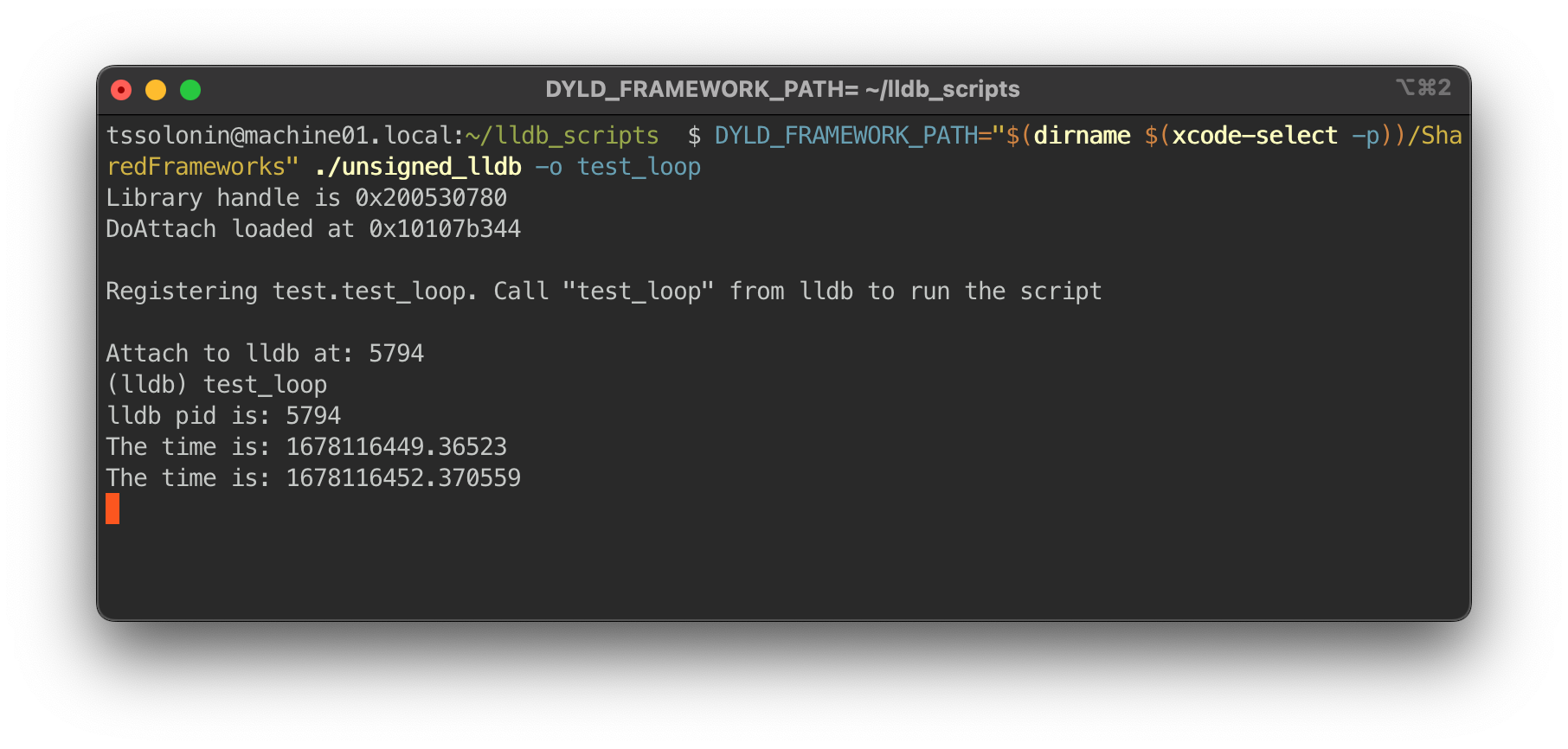
<p>If you now run <code class="language-plaintext highlighter-rouge">lldb</code>, the library handle and the <code class="language-plaintext highlighter-rouge">DoAttach</code> function address will print out:</p>

<p><img src="/assets/3/lldb_output_3.png" alt="lldb_output_3" /></p>

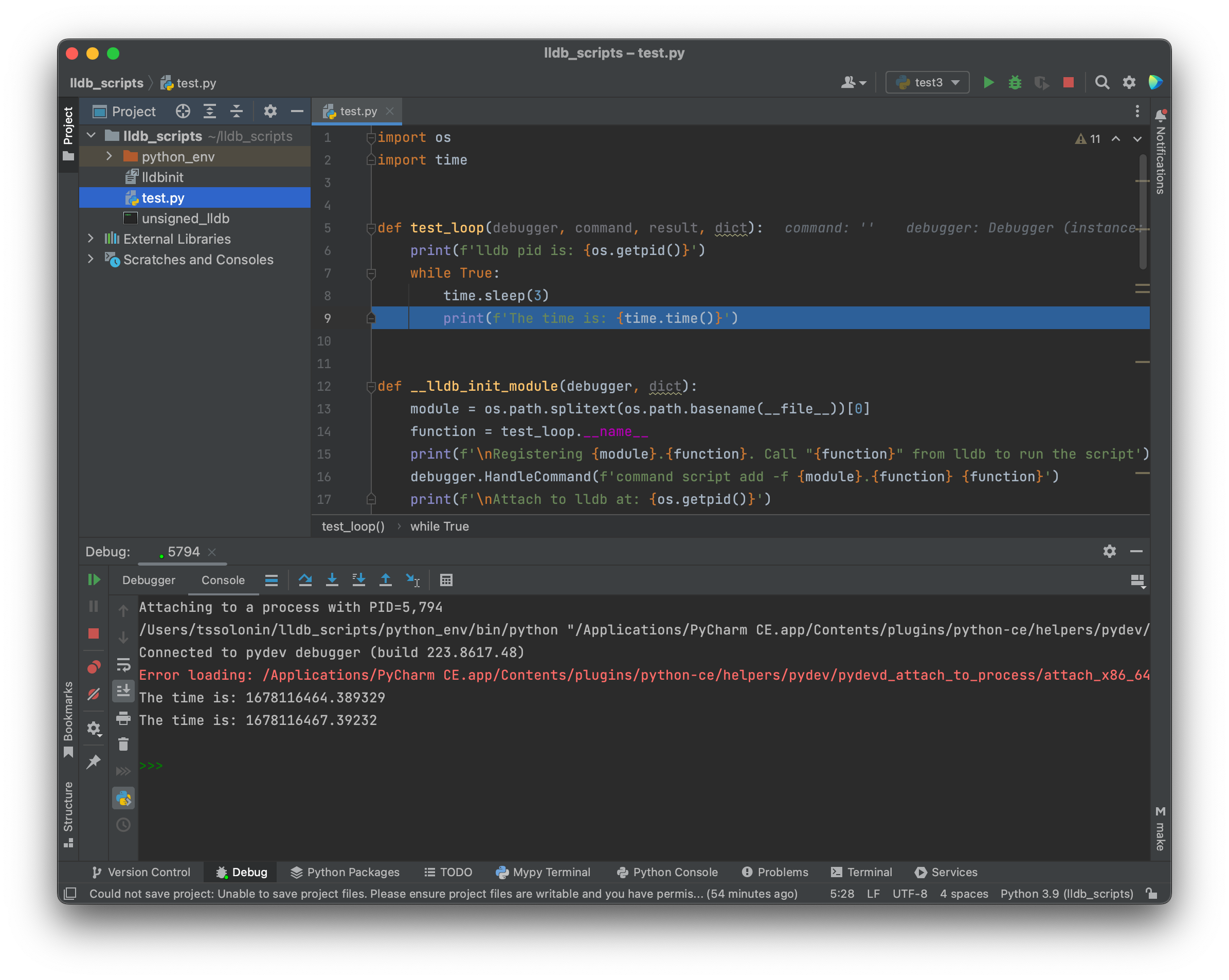
<p>And attaching in PyCharm should finally work as expected:</p>

<p><img src="/assets/3/pycharm_1.png" alt="pycharm_1" /></p>

<p>PyCharm still tries to inject the Intel library, but everything works out since we preloaded the <code class="language-plaintext highlighter-rouge">DoAttach</code> function.</p>

<h2 id="working-in-pycharm">
<a href="#working-in-pycharm" class="heading-link">
Working in PyCharm
</a>
</h2>

<p><strong>UPD:</strong> I was originally using <code class="language-plaintext highlighter-rouge">pydevd.settrace()</code> to break execution. Actually there is need no call pydevd API directly, just set a breakpoint in PyCharm and execution will break as usual.</p>

<details>
  <summary>But here is how you could tinkerer with pydevd directly from lldb</summary>

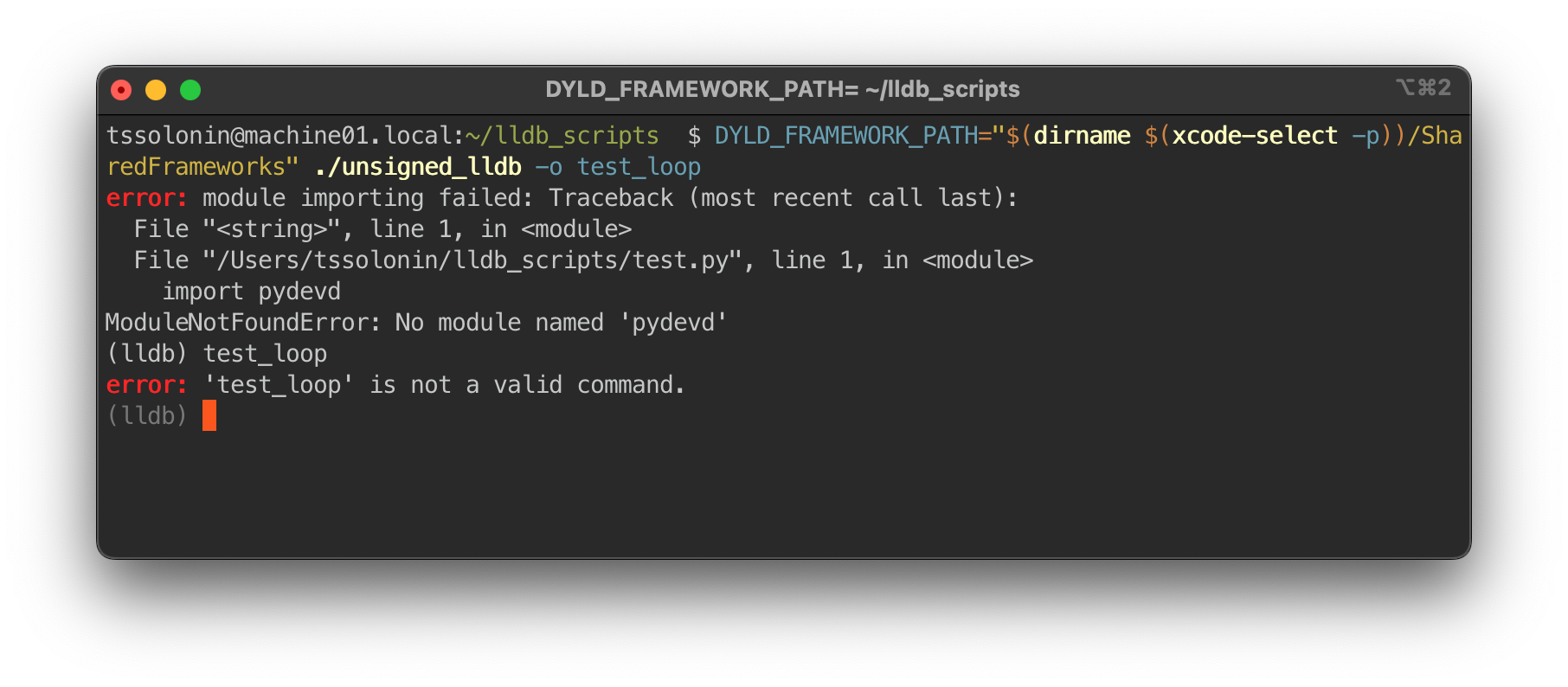
  <p>The issue is that neither the project in PyCharm, where we work on the script, nor lldb, where the script executes, know anything about <code class="language-plaintext highlighter-rouge">pydevd</code> APIs. If we stick <code class="language-plaintext highlighter-rouge">import pydevd</code> into the script, nothing works:</p>

  <p><img src="/assets/3/lldb_output_4.png" alt="lldb_output_4" /></p>

  <p>Let’s first fix the lldb runtime. On my <code class="language-plaintext highlighter-rouge">PyCharm CE</code> pydevd is located in:</p>

  <div class="language-plaintext highlighter-rouge"><div class="highlight"><pre class="highlight"><code>/Applications/PyCharm CE.app/Contents/plugins/python-ce/helpers/pydev
</code></pre></div>  </div>

  <p>To make the <code class="language-plaintext highlighter-rouge">pydevd</code> module accessible to the lldb runtime, we need to add this directory to the python module search paths using the  <code class="language-plaintext highlighter-rouge">sys.path</code> API. Try adding the following lines at the beginning of <code class="language-plaintext highlighter-rouge">test.py</code>:</p>

  <p><img src="/assets/3/pydevd.png" alt="lldb_output_4" /></p>

  <p>The <code class="language-plaintext highlighter-rouge">lldb -o test_loop</code> command is working again!</p>

  <p>To make PyCharm aware of the API do:</p>

  <div class="language-bash highlighter-rouge"><div class="highlight"><pre class="highlight"><code><span class="nv">$ </span><span class="nb">echo</span> <span class="s1">'/Applications/PyCharm CE.app/Contents/plugins/python-ce/helpers/pydev'</span> <span class="o">&gt;</span> <span class="s2">"</span><span class="si">$(</span><span class="nb">echo </span>python_env/lib/python<span class="k">*</span><span class="si">)</span><span class="s2">/site-packages/pydev.pth"</span>
</code></pre></div>  </div>

  <p>We can now <code class="language-plaintext highlighter-rouge">import pydevd</code>. Go to the <code class="language-plaintext highlighter-rouge">test_loop</code> function and rewrite it to:</p>

  <div class="language-python highlighter-rouge"><div class="highlight"><pre class="highlight"><code><span class="kn">import</span> <span class="nn">os</span>
<span class="kn">import</span> <span class="nn">sys</span>
<span class="n">sys</span><span class="p">.</span><span class="n">path</span><span class="p">.</span><span class="n">append</span><span class="p">(</span><span class="s">'/Applications/PyCharm CE.app/Contents/plugins/python-ce/helpers/pydev'</span><span class="p">)</span>
<span class="kn">from</span> <span class="nn">lldb</span> <span class="kn">import</span> <span class="n">SBDebugger</span><span class="p">,</span> <span class="n">SBCommandReturnObject</span>  
<span class="kn">from</span> <span class="nn">pydevd</span> <span class="kn">import</span> <span class="n">settrace</span>  
  
<span class="k">def</span> <span class="nf">test_loop</span><span class="p">(</span>  
    <span class="n">debugger</span><span class="p">:</span> <span class="n">SBDebugger</span><span class="p">,</span>  
    <span class="n">command</span><span class="p">:</span> <span class="nb">str</span><span class="p">,</span>  
    <span class="n">result</span><span class="p">:</span> <span class="n">SBCommandReturnObject</span><span class="p">,</span>  
    <span class="nb">dict</span>  
<span class="p">):</span>  
    <span class="n">settrace</span><span class="p">()</span>  
    <span class="k">print</span><span class="p">(</span><span class="n">command</span><span class="p">)</span>  
    <span class="k">print</span><span class="p">(</span><span class="n">debugger</span><span class="p">.</span><span class="n">GetSelectedTarget</span><span class="p">())</span>  
    <span class="n">result</span><span class="p">.</span><span class="n">AppendWarning</span><span class="p">(</span><span class="sa">f</span><span class="s">'Warning from </span><span class="si">{</span><span class="n">test_loop</span><span class="p">.</span><span class="n">__name__</span><span class="si">}</span><span class="s">'</span><span class="p">)</span>  
    <span class="k">print</span><span class="p">(</span><span class="s">''</span><span class="p">)</span>
</code></pre></div>  </div>

</details>

<p><br /></p>

<p>Now that all platforms are attachable, we need to make PyCharm aware of the <code class="language-plaintext highlighter-rouge">lldb</code> API. One way to do that is to create a <code class="language-plaintext highlighter-rouge">pth</code> pointer in the <code class="language-plaintext highlighter-rouge">site-packages</code>:</p>

<div class="language-bash highlighter-rouge"><div class="highlight"><pre class="highlight"><code><span class="nv">$ </span><span class="nb">echo</span> <span class="s2">"</span><span class="si">$(</span><span class="nb">dirname</span> <span class="si">$(</span>xcode-select <span class="nt">-p</span><span class="si">))</span><span class="s2">"</span>/SharedFrameworks/LLDB.framework/Versions/A/Resources/Python <span class="o">&gt;</span> <span class="s2">"</span><span class="si">$(</span><span class="nb">echo </span>python_env/lib/python<span class="k">*</span><span class="si">)</span><span class="s2">/site-packages/lldb.pth"</span>
</code></pre></div></div>

<p>Finally, <code class="language-plaintext highlighter-rouge">import lldb</code> works, and we are able to explore the API with proper code-completions.</p>

<p>To attach to this script, do the following steps:</p>
<ol>
  <li>Launch <code class="language-plaintext highlighter-rouge">lldb</code></li>
  <li>Attach PyCharm to the <code class="language-plaintext highlighter-rouge">lldb</code> process</li>
  <li>Set a breakpoint</li>
  <li>Call the command from <code class="language-plaintext highlighter-rouge">lldb</code></li>
</ol>

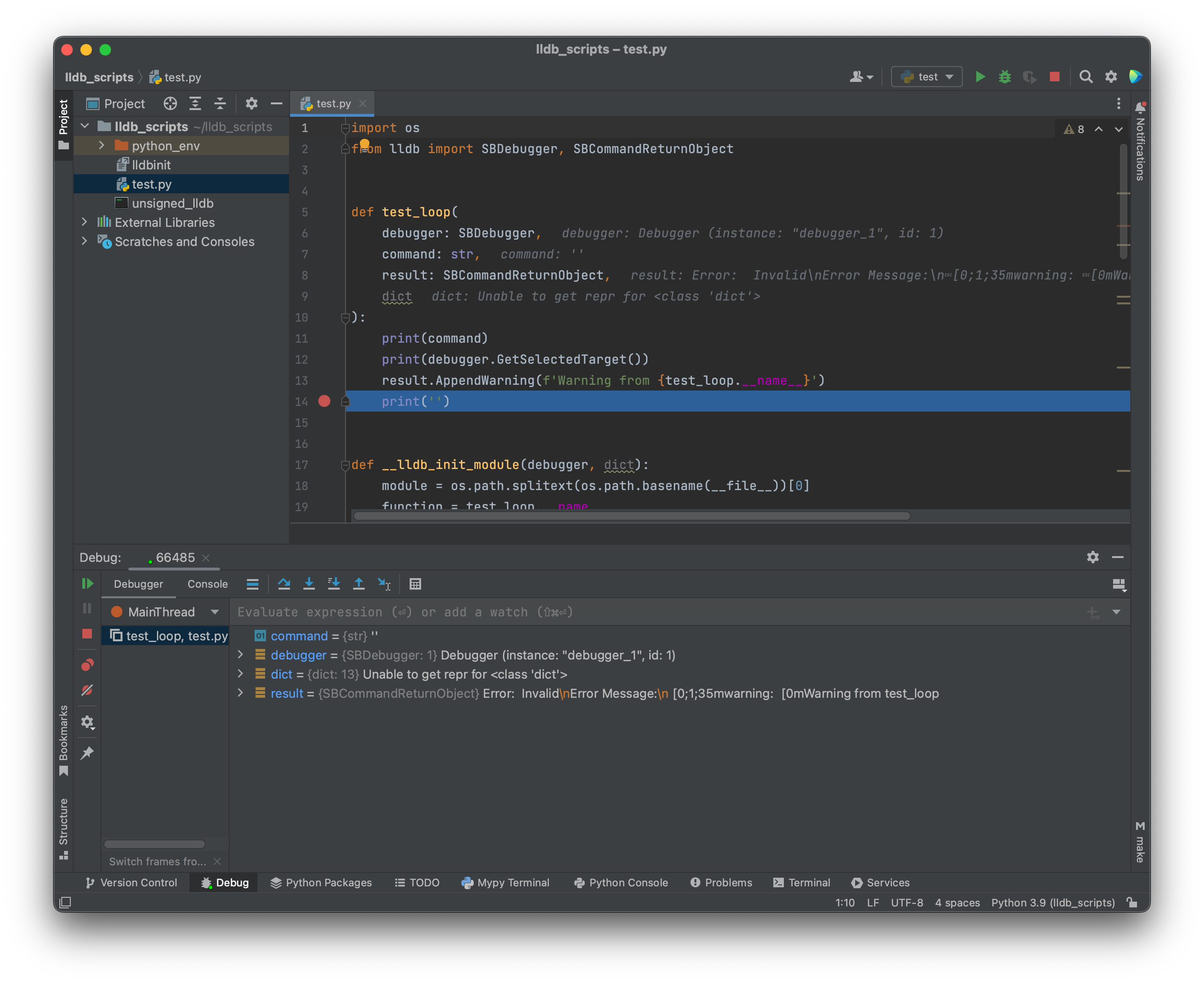
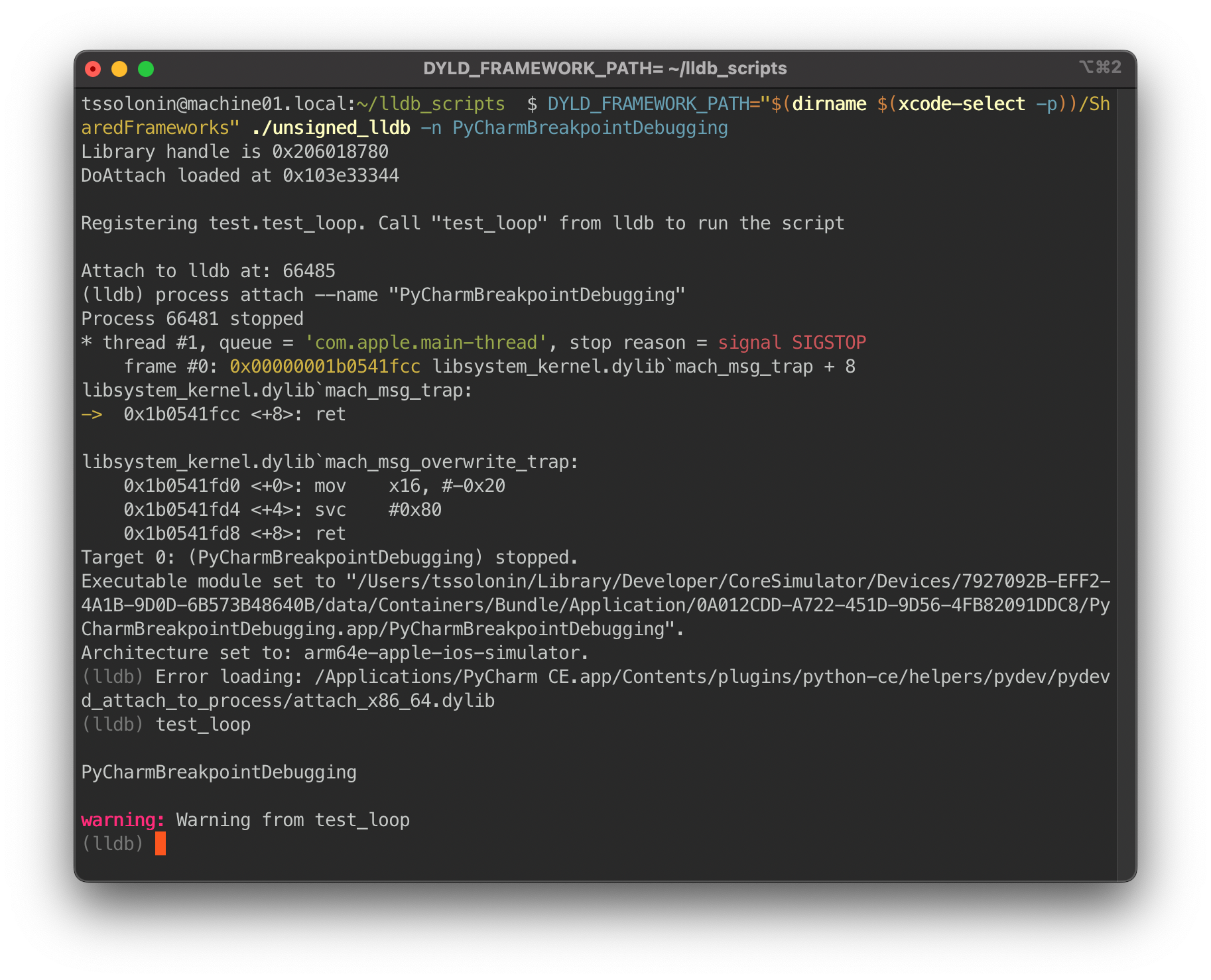
<p>PyCharm will break at the breakpoint. This is what it should look like:</p>

<p><img src="/assets/3/pycharm_debugging_updated.png" alt="pycharm_left" /></p>

<p><img src="/assets/3/lldb_debugging_updated.png" alt="lldb_right" /></p>

<p>🎉</p>

<h2 id="scripting-examples">
<a href="#scripting-examples" class="heading-link">
Scripting examples
</a>
</h2>

<p>With the might of PyCharm in our hands, let’s slap together some useful scripts.</p>

<p>How about <a href="https://gist.github.com/abdulowork/98ee0d9170e949488c508390ce81cb4f">this one</a> for automating the <a href="https://abdulowork.github.io/Hacking-Finder-with-lldb-and-Hopper/">Finder hack</a>?</p>

<video preload="auto" muted="" controls="" width="100%">
  <source src="/assets/3/browse_packages.mp4" type="video/mp4" />
  <source src="/assets/3/browse_packages.webm" type="video/webm" />
</video>

<p>In addition to commands, it is also possible to script breakpoints. Let’s <a href="https://gist.github.com/abdulowork/d61303baf22b6d0feb469f12f949b1f9">dump an image</a> of a view any time <code class="language-plaintext highlighter-rouge">viewDidAppear</code> is called by reading a pointer from the Objective-C method and generating a Swift expression using Python.</p>

<video preload="auto" muted="" controls="" width="100%">
  <source src="/assets/3/scripting_breakpoint.mp4" type="video/mp4" />
  <source src="/assets/3/scripting_breakpoint.webm" type="video/webm" />
</video>

<p>Amazing!</p>]]></content><author><name>Timofey Solonin</name><email>abdulowork@gmail.com</email></author><category term="lldb" /><category term="PyCharm" /><category term="pydevd" /><category term="arm64" /><category term="x86_64" /><category term="debugging" /><category term="IDE" /><category term="dlopen" /><summary type="html"><![CDATA[Debugging in lldb can be great. But sometimes, running commands manually becomes tedious. Fortunately, lldb provides a way to automate any action: Python scripts! However, writing Python scripts without IDE support and a debugger is beneath any developer’s dignity. In this tutorial, I will show you how to set up PyCharm to take your lldb scripting experience to the next level. There will be: Python and PyCharm setup for lldb scripting PyCharm fix for process attachment on an arm64 macOS Python modules injection for IDE and runtime support Debugging breakpoints and commands in PyCharm]]></summary><media:thumbnail xmlns:media="http://search.yahoo.com/mrss/" url="https://abdulowork.github.io/assets/3/title_updated.png" /><media:content medium="image" url="https://abdulowork.github.io/assets/3/title_updated.png" xmlns:media="http://search.yahoo.com/mrss/" /></entry><entry><title type="html">Building Swift Code Faster</title><link href="https://abdulowork.github.io/Building-Swift-Code-Faster/" rel="alternate" type="text/html" title="Building Swift Code Faster" /><published>2022-09-04T00:00:00+00:00</published><updated>2022-09-04T00:00:00+00:00</updated><id>https://abdulowork.github.io/Building-Swift-Code-Faster</id><content type="html" xml:base="https://abdulowork.github.io/Building-Swift-Code-Faster/"><![CDATA[<p><img src="/assets/2/title.png.webp" alt="title" /></p>

<p>How do you speed up the build of your Swift project? Do you use <code class="language-plaintext highlighter-rouge">-warn-long-function-bodies</code> or maybe even <code class="language-plaintext highlighter-rouge">-stats-output-dir</code>? These can find some compilation performance issues, but how do you truly take your build times to the next level?</p>

<p>In this article, I want to show you how tweaking some build settings can drastically speed up your clean build times.</p>

<!--more-->

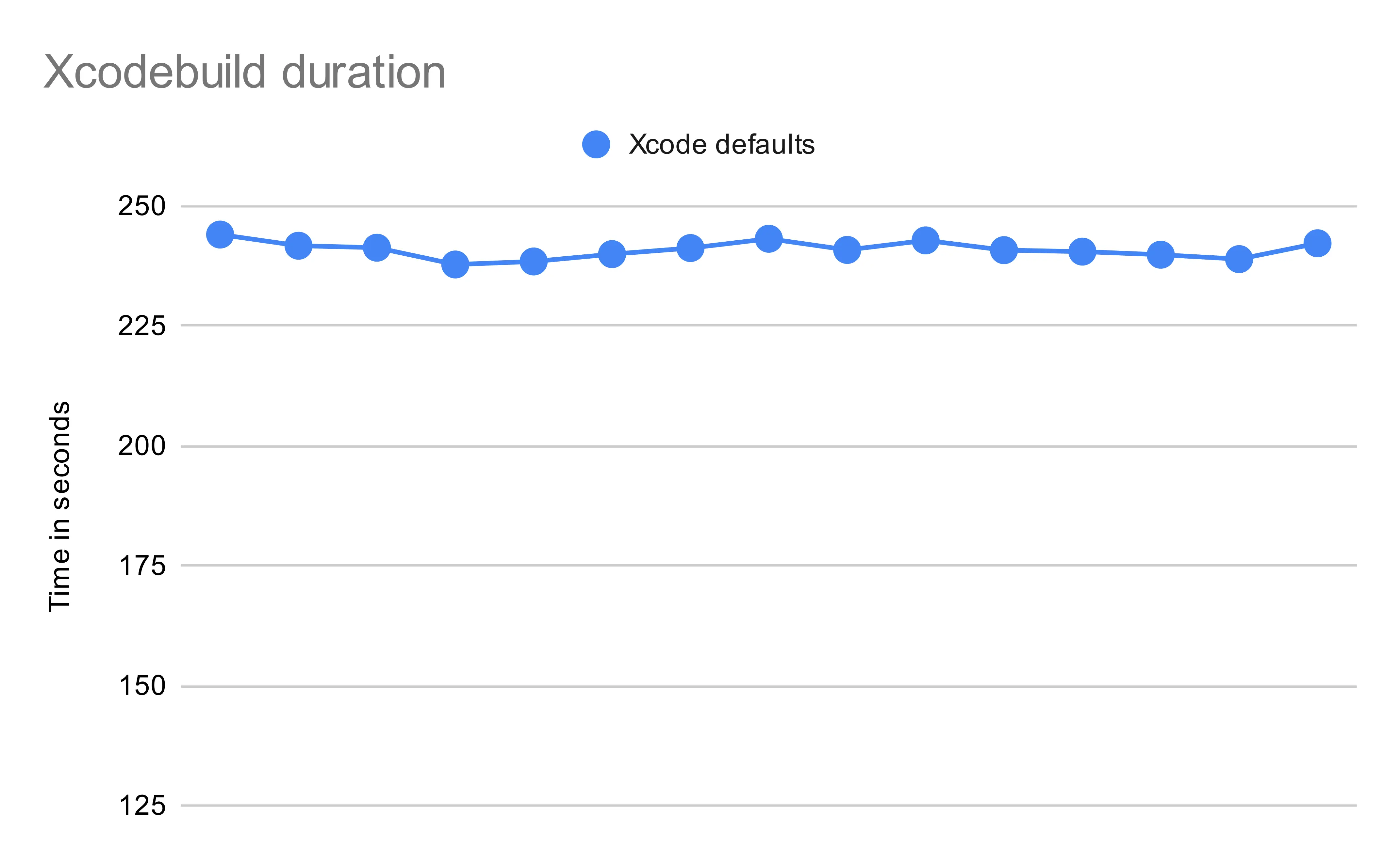
<p>Let us start by building Avito with the default Xcode build settings. For the benchmark, I am using <code class="language-plaintext highlighter-rouge">M1 Pro</code> with <code class="language-plaintext highlighter-rouge">32 GB</code> RAM. Here is the result:</p>

<p><img src="/assets/2/measurement_0.png.webp" alt="measurements_0" /></p>

<p>So our clean build time is somewhere around 240 seconds. Is that good? Is that bad? Let us compute some stats for our project.</p>

<p>A way to measure the size of the project is to use a <a href="https://github.com/AlDanial/cloc">cloc</a> utility.<br />
Here is what we got:</p>

<ul>
  <li>1 240 000 lines of Swift code</li>
  <li>100 000 lines of Objective-C code (mostly external dependencies)</li>
  <li>6000 lines of C code</li>
</ul>

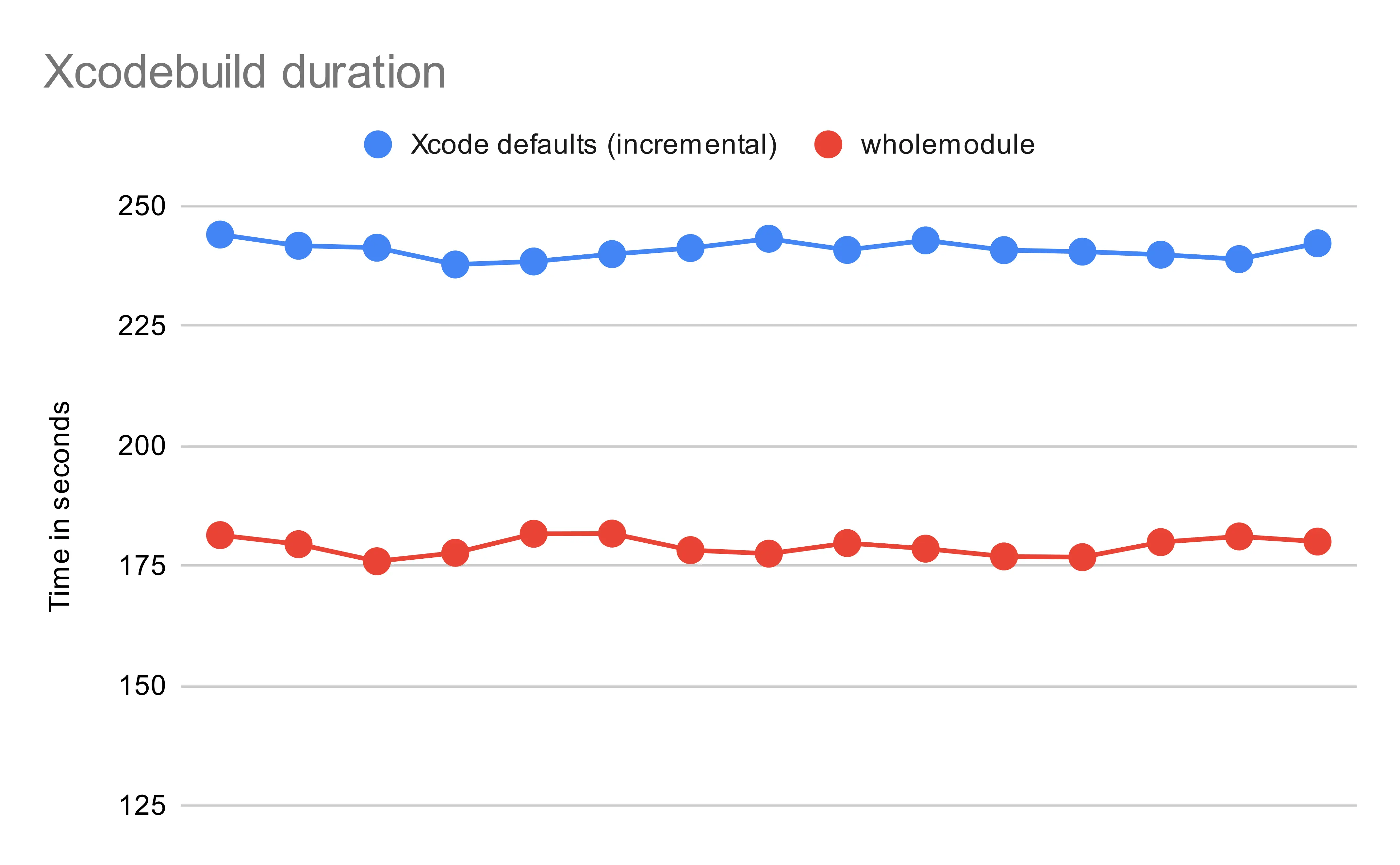
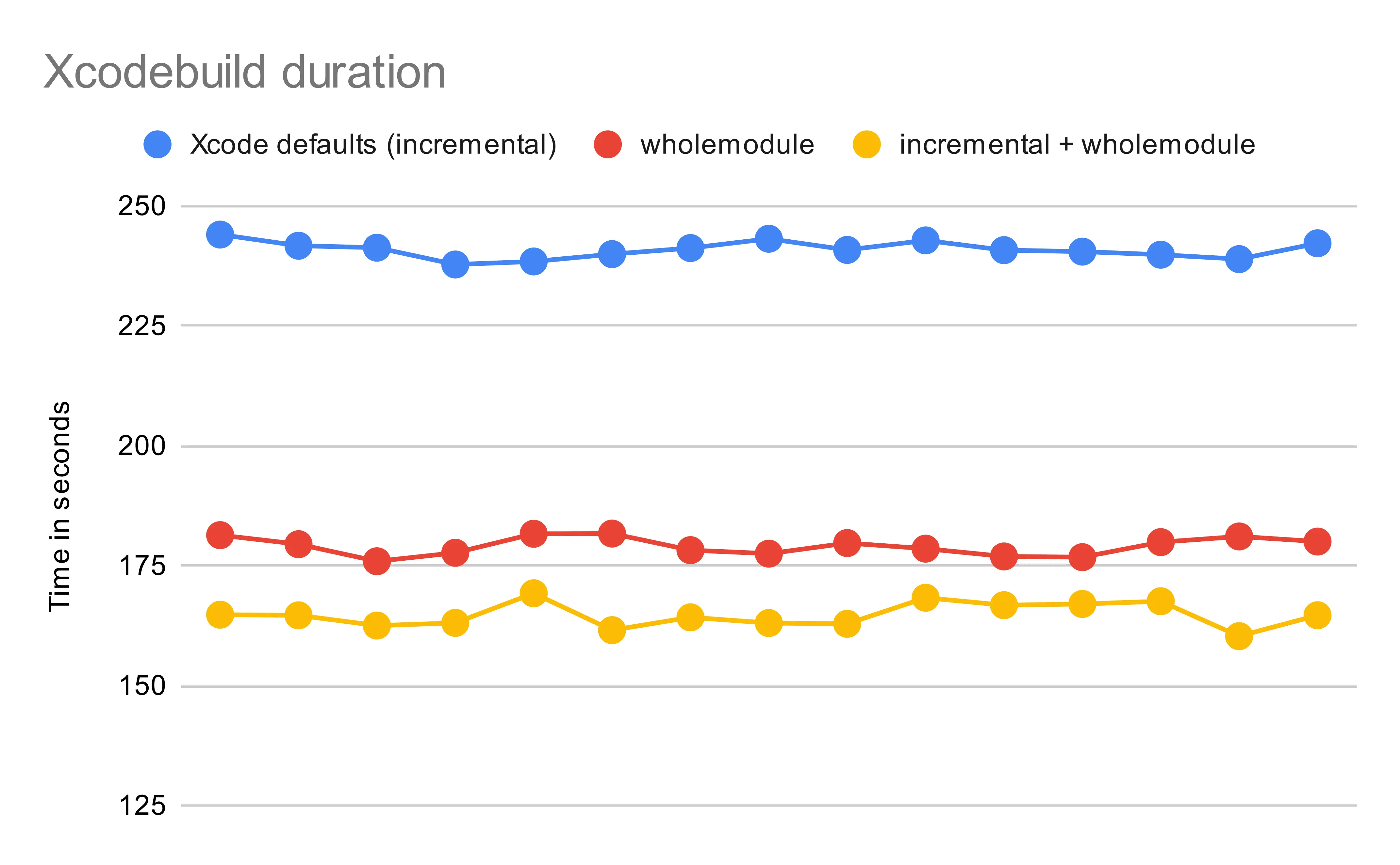
<p>I would say that 240 seconds is not bad. But can we go faster? Let us switch <code class="language-plaintext highlighter-rouge">SWIFT_COMPILATION_MODE</code> from <code class="language-plaintext highlighter-rouge">incremental</code> to <code class="language-plaintext highlighter-rouge">wholemodule</code> and see where that leads.<br /> 
This change gets us to the following build duration distribution:</p>

<p><img src="/assets/2/measurement_1.png.webp" alt="measurements_1" /></p>

<p><strong>Now the average build time is 179 seconds. Somehow our build got faster by 25%!</strong></p>

<h2 id="how-well-is-your-build-parallelized">
<a href="#how-well-is-your-build-parallelized" class="heading-link">
How well is your build parallelized?
</a>
</h2>

<p>To understand why the build became faster, we first need to know the difference between <code class="language-plaintext highlighter-rouge">incremental</code> and <code class="language-plaintext highlighter-rouge">wholemodule</code> compilation modes.</p>

<p>The summary is:</p>

<ul>
  <li>When we build with <code class="language-plaintext highlighter-rouge">incremental</code>, the build system uses a batch mode for the swift compiler. The batch mode splits each module compilation into multiple jobs and executes those jobs in parallel.</li>
  <li>On the other hand, <code class="language-plaintext highlighter-rouge">wholemodule</code> runs a mostly single-threaded compilation of the module without splitting it in any way.</li>
</ul>

<p>So <code class="language-plaintext highlighter-rouge">incremental</code> looks like it should be faster due to better parallelization, but why does <code class="language-plaintext highlighter-rouge">wholemodule</code> perform better in the end?</p>
<ol>
  <li><code class="language-plaintext highlighter-rouge">incremental</code> build is slower because the compiler has to do more work compiling a module in batches rather than compiling a module as a whole which results in some overhead.<br /></li>
  <li>At the same time, even though the <code class="language-plaintext highlighter-rouge">wholemodule</code> compilation is single-threaded, many modules still build in parallel, making this mode efficient.</li>
</ol>

<p>The <a href="https://github.com/apple/swift/blob/b65e1bb5b566f6509430bc01a494086b3b31769b/docs/CompilerPerformance.md">compiler documentation</a> also makes a note that <code class="language-plaintext highlighter-rouge">wholemodule</code> could be faster than <code class="language-plaintext highlighter-rouge">incremental</code> under circumstances where many modules build in parallel:</p>

<blockquote>
  <p>It is, therefore, possible that in certain cases (such as with limited available parallelism / many modules built in parallel), building in whole-module mode with optimization disabled can complete in less time than batched primary-file mode</p>
</blockquote>

<p>So how well is build at Avito parallelized?<br />
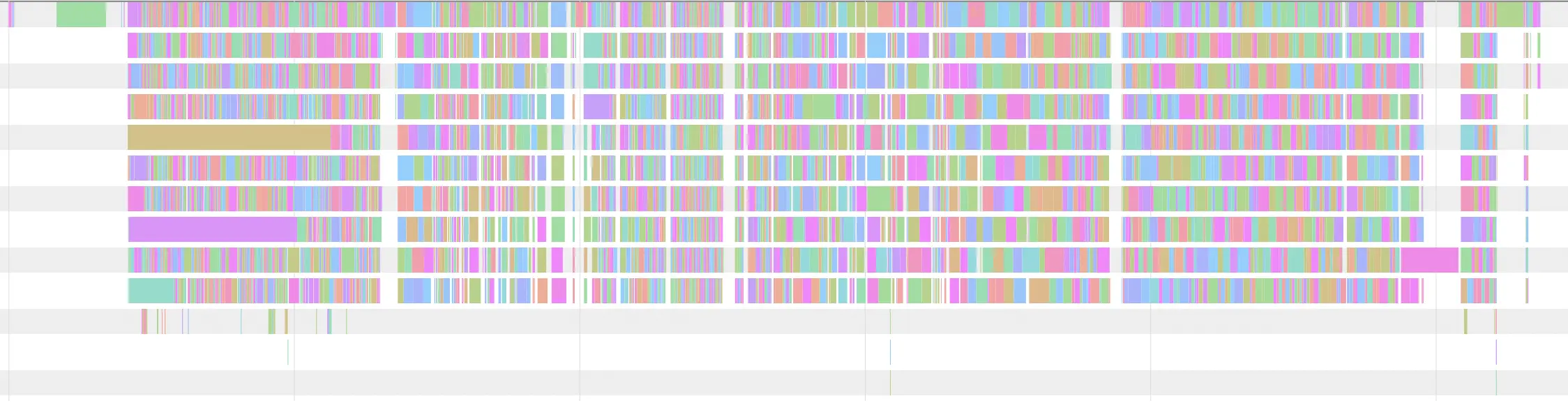
To understand that, we will employ a visualization similar to that introduced in Xcode 14. It allows us to see how many modules build in parallel at a particular time.</p>

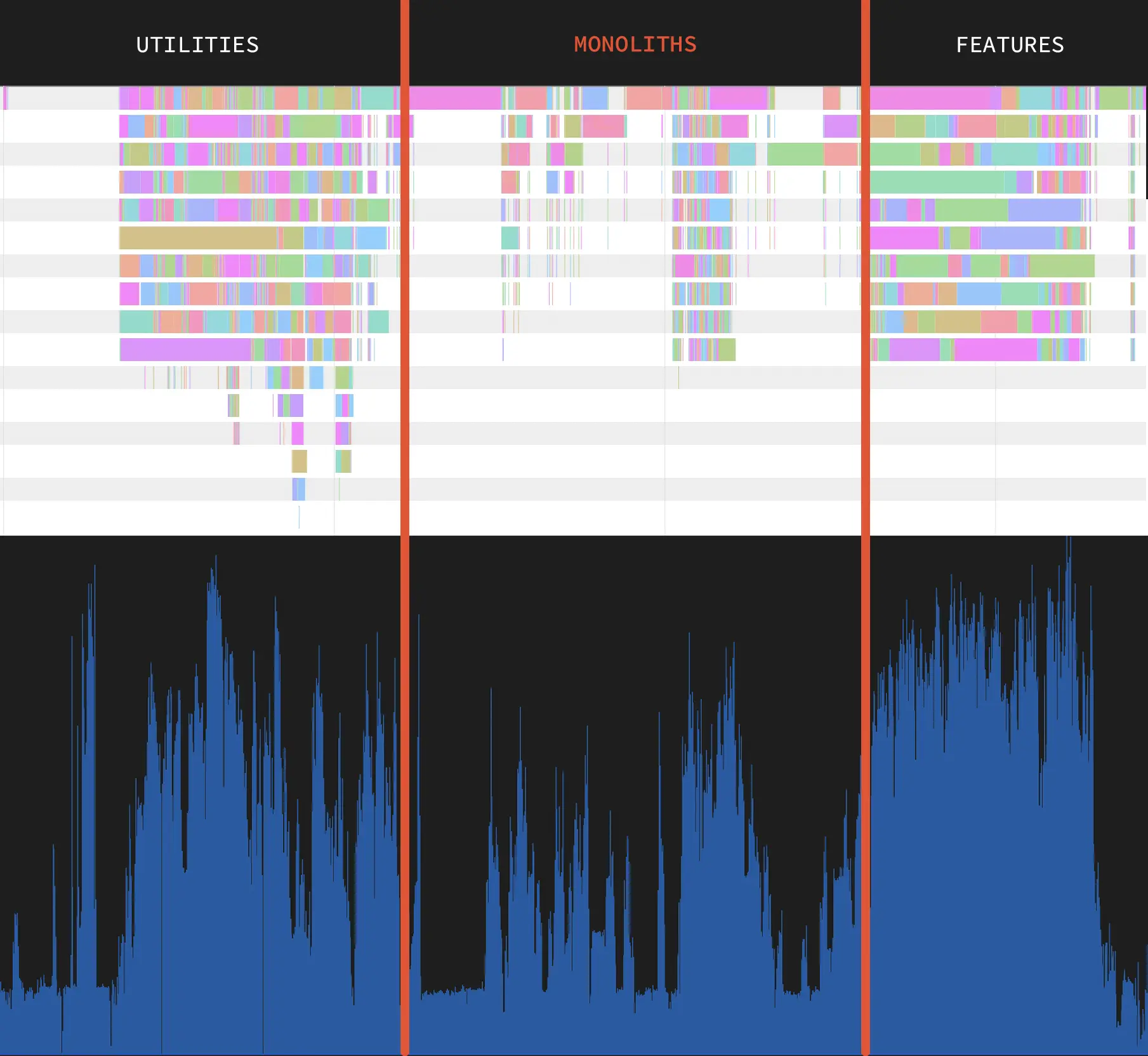
<p>Let us first take a look at Avito built with <code class="language-plaintext highlighter-rouge">incremental</code> compilation mode:</p>

<p><img src="/assets/2/incremental.png.webp" alt="incremental" /></p>

<p>Here colored rectangles represent heavy Xcode build system invocations: <code class="language-plaintext highlighter-rouge">swiftc</code>, <code class="language-plaintext highlighter-rouge">ld</code>, and some other tools such as <code class="language-plaintext highlighter-rouge">actool</code>. The build seems well parallelized with the <code class="language-plaintext highlighter-rouge">incremental</code> compilation mode.</p>

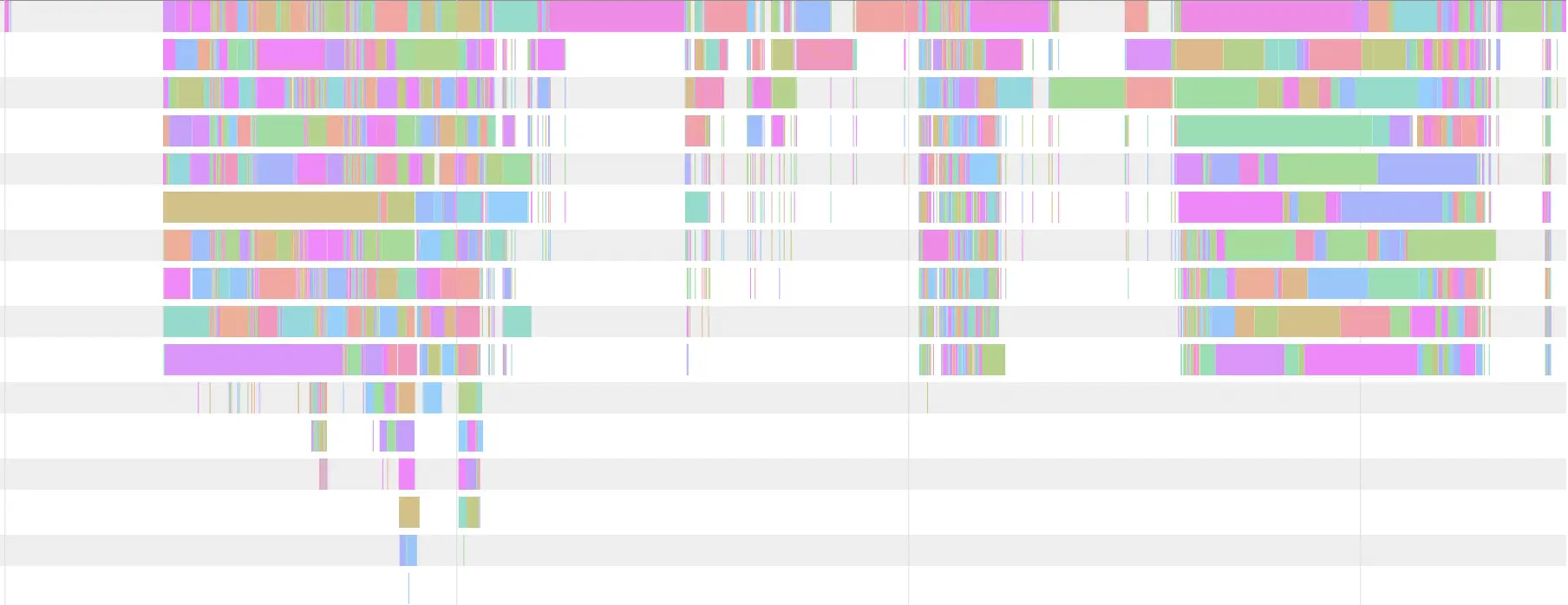
<p>Now take a look at the visualization produced with <code class="language-plaintext highlighter-rouge">wholemodule</code> compilation mode:</p>

<p><img src="/assets/2/wmo.png.webp" alt="wmo" /></p>

<p>We can see where Avito build is faring well and where it could do better. The reason for this specific shape of the graph is our architecture. At first, we build different utilities which don’t have many dependencies, then follow the poorly parallelized parts of the build - monolithic modules. At last, we have feature modules that don’t depend on one another and build in parallel.</p>

<p>Another way to look at build performance is by looking at CPU utilization. The Instruments <code class="language-plaintext highlighter-rouge">CPU Profiler</code> trace maps to the <code class="language-plaintext highlighter-rouge">wholemodule</code> graph quite well:</p>

<p><img src="/assets/2/wmo_with_cpu.png.webp" alt="wmo_with_cpu" /></p>

<p>As expected, there is a sag in CPU utilization where parallelization isn’t perfect.</p>

<h2 id="squeezing-the-last-bits-of-build-performance">
<a href="#squeezing-the-last-bits-of-build-performance" class="heading-link">
Squeezing the last bits of build performance
</a>
</h2>

<p>In an ideal build scenario, all modules would build parallel across all available cores. Unfortunately, mistakes in architecture can make such a goal unattainable.</p>

<p><strong>However, there is something we can do to make the build more efficient without reengineering everything from scratch.</strong><br />
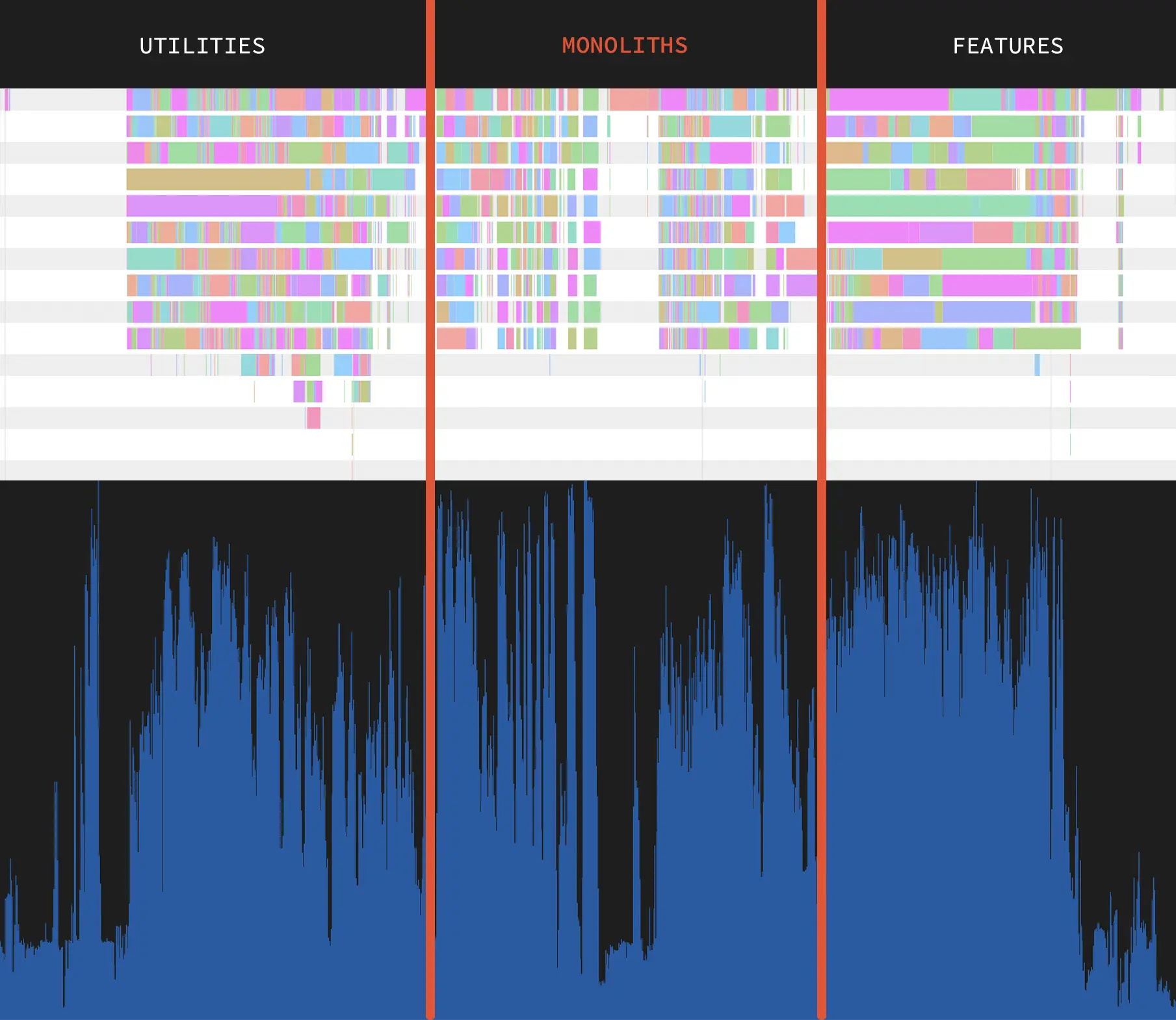
What if we try to leverage the best of <code class="language-plaintext highlighter-rouge">wholemodule</code> and <code class="language-plaintext highlighter-rouge">incremental</code> simultaneously? We can keep using <code class="language-plaintext highlighter-rouge">wholemodule</code> where the build process is parallelized well and switch to <code class="language-plaintext highlighter-rouge">incremental</code> for those monolithic modules in the middle. That leads to the following build distribution:</p>

<p><img src="/assets/2/measurement_2.png.webp" alt="measurements_2" /></p>

<p><strong>This change gave us another 14 seconds!</strong>
The CPU is loaded much more evenly, and gaps in the build graph are smaller.</p>

<p><img src="/assets/2/wmo_and_incremental_with_cpu.png.webp" alt="wmo_and_incremental_with_cpu" /></p>

<h2 id="what-s-next">
<a href="#what-s-next" class="heading-link">
What’s next?
</a>
</h2>

<p>Here we only looked at clean builds. Next time I will tell you all about the incremental builds at Avito!</p>

<p>Does tweaking compilation modes make your builds faster? How large is your project, and how swiftly does it build? Let me know in the comments!</p>]]></content><author><name>Timofey Solonin</name><email>abdulowork@gmail.com</email></author><category term="xcodebuild" /><category term="Xcode" /><category term="build" /><category term="system" /><category term="compilation" /><category term="speed" /><category term="wholemodule" /><category term="incremental" /><summary type="html"><![CDATA[How do you speed up the build of your Swift project? Do you use -warn-long-function-bodies or maybe even -stats-output-dir? These can find some compilation performance issues, but how do you truly take your build times to the next level? In this article, I want to show you how tweaking some build settings can drastically speed up your clean build times.]]></summary><media:thumbnail xmlns:media="http://search.yahoo.com/mrss/" url="https://abdulowork.github.io/assets/2/title.png" /><media:content medium="image" url="https://abdulowork.github.io/assets/2/title.png" xmlns:media="http://search.yahoo.com/mrss/" /></entry><entry><title type="html">Hacking the Finder with lldb and Hopper</title><link href="https://abdulowork.github.io/Hacking-Finder-with-lldb-and-Hopper/" rel="alternate" type="text/html" title="Hacking the Finder with lldb and Hopper" /><published>2022-05-01T00:00:00+00:00</published><updated>2022-05-01T00:00:00+00:00</updated><id>https://abdulowork.github.io/Hacking-Finder-with-lldb-and-Hopper</id><content type="html" xml:base="https://abdulowork.github.io/Hacking-Finder-with-lldb-and-Hopper/"><![CDATA[<p><img src="/assets/1/title.png.webp" alt="title" /></p>

<p>Do you want to never press <code class="language-plaintext highlighter-rouge">Show Package Contents</code> again? Or maybe you just want to learn a couple of practical lldb techniques? Either way, I invite you on the journey to discover a hidden feature within the Finder!</p>

<!--more-->

<p>In this article I will be using:</p>

<ul>
  <li>Hopper disassembler</li>
  <li>Multiple lldb features</li>
  <li>Opcode manipulation to change a program behavior</li>
</ul>

<p>I hope you will learn something new!</p>

<h2 id="the-backstory">
<a href="#the-backstory" class="heading-link">
The backstory
</a>
</h2>

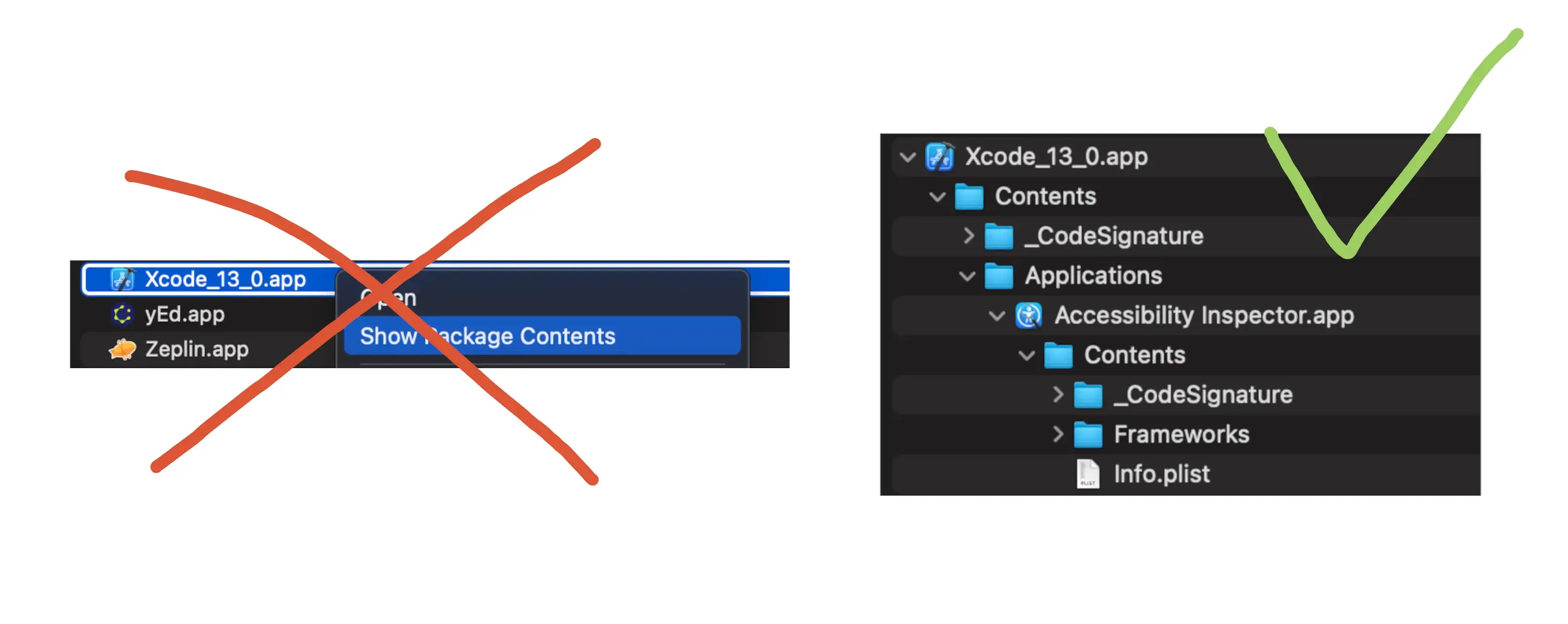
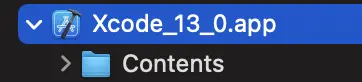
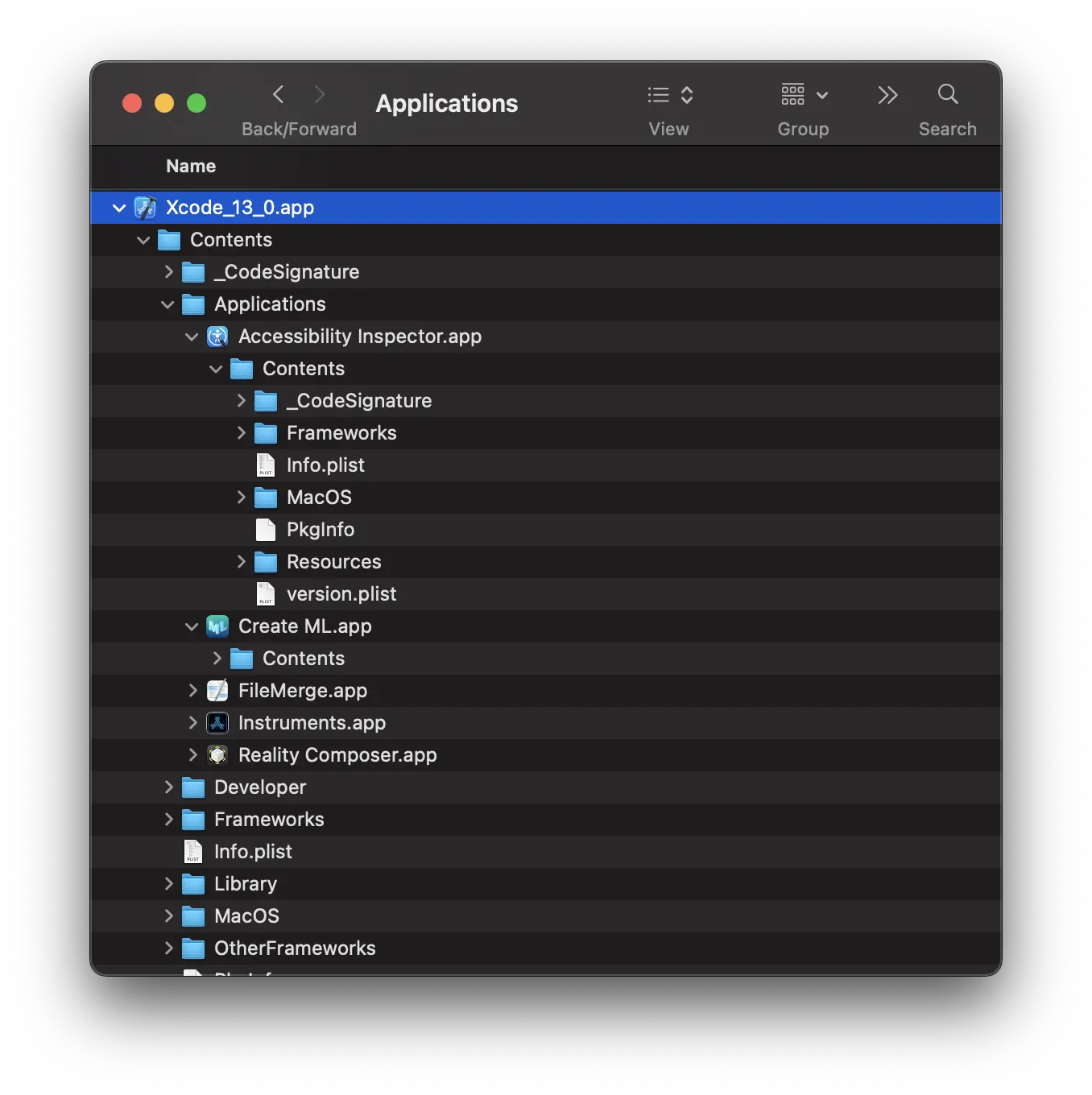
<p>Recently I had to work a lot with packages. What kind of packages? The most usual example of a package is an <strong>.app</strong> bundle, for example, the <strong>Xcode.app:</strong></p>

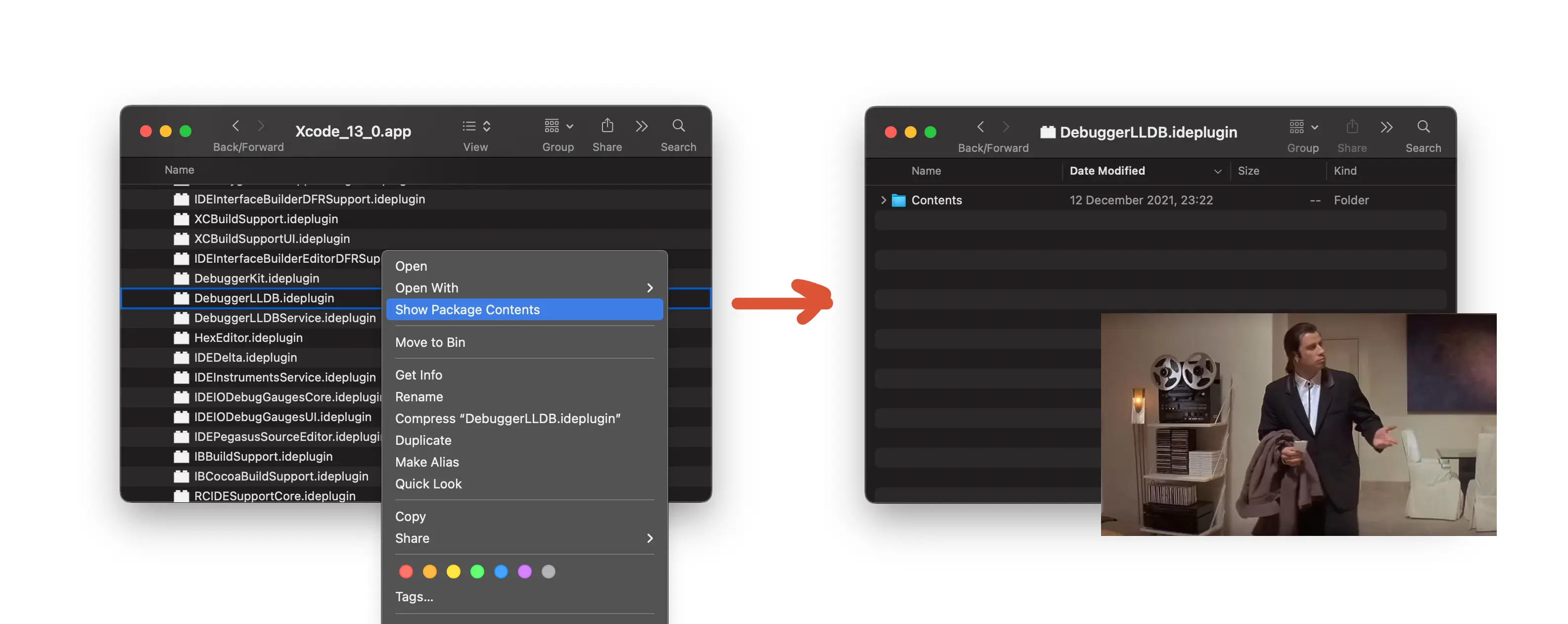
<p>Imagine you are working on an <strong>.app</strong> with multiple <strong>.bundle</strong> and <strong>.appex</strong> directories inside it. If you want to inspect the contents of this hierarchy, you would normally use a Finder. You build using Xcode, go to the DerivedData/Build/Products, and… unfortunately, to view the contents of each package you have to click through <code class="language-plaintext highlighter-rouge">Show Package Contents</code>. This is inconvenient because Finder doesn’t allow you to easily walk in and out of the package and working with multiple packages simultaneously easily gives you vertigo.</p>

<p><img src="/assets/1/show_package_contents.png.webp" alt="show_package_contents" /></p>

<p>But what if it was possible to view packages as regular directories? After all, package <strong>is just a regular directory</strong>. How does Finder even understand something is a package? It turns out some file extensions such as .<strong>app</strong> are hardcoded in LaunchServices to be recognized as packages. For example, if you simply create a directory:</p>

<div class="language-bash highlighter-rouge"><div class="highlight"><pre class="highlight"><code><span class="nv">$ </span><span class="nb">mkdir </span>Example.app
</code></pre></div></div>

<p>it will show up as a package in the Finder.</p>

<p>You can also <a href="https://developer.apple.com/library/archive/documentation/CoreFoundation/Conceptual/CFBundles/AboutBundles/AboutBundles.html#//apple_ref/doc/uid/10000123i-CH100-SW1">register</a> your own file extensions as packages:</p>

<p><img src="/assets/1/apple_bundles.png.webp" alt="apple_bundles" /></p>

<h2 id="reverse-engineering-finder-using-hopper">
<a href="#reverse-engineering-finder-using-hopper" class="heading-link">
Reverse engineering Finder using Hopper
</a>
</h2>

<p><a href="https://www.hopperapp.com/">Hopper</a> is a great tool to learn about how a program works. Hopper’s basic utility is a binary disassembly tool but it also has many features which can give you a better insight into how a program operates. For example, it can turn assembly back into a pseudo-code which is often much easier to reason about than an assembly.</p>

<p>Let’s start by opening the Finder in Hopper and seeing if we can spot something of interest:</p>

<div class="language-bash highlighter-rouge"><div class="highlight"><pre class="highlight"><code><span class="nv">$ </span>hopperv4 <span class="nt">--executable</span> /System/Library/CoreServices/Finder.app/Contents/MacOS/Finder
</code></pre></div></div>

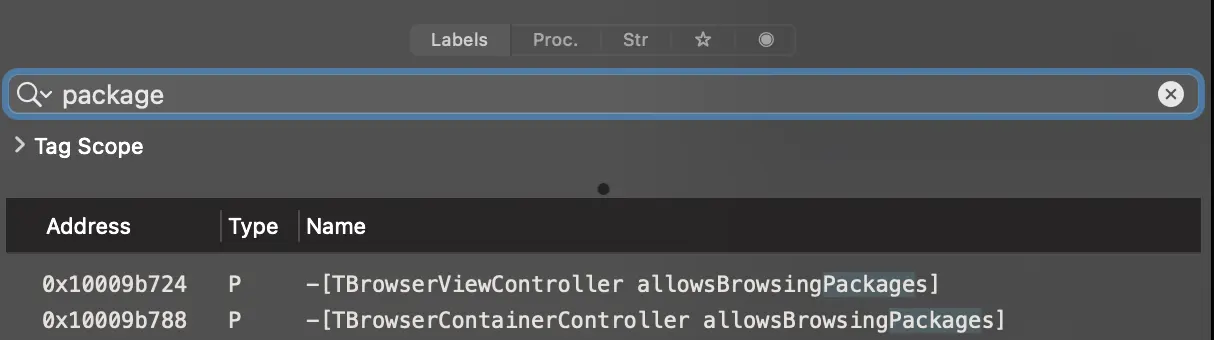
<p>Now we can search for references to “packages”:</p>

<p><img src="/assets/1/package_search_hopper.png.webp" alt="package_search_hopper" /></p>

<p>And thankfully there are some! Of particular interest to us is the procedure lurking under the symbol <code class="language-plaintext highlighter-rouge">-[TBrowserContainerController allowsBrowsingPackages]</code>. If we look at the pseudo-code there is something weird about this procedure:</p>

<div class="language-objectivec highlighter-rouge"><div class="highlight"><pre class="highlight"><code><span class="kt">int</span> <span class="o">-</span><span class="p">[</span><span class="n">TBrowserContainerController</span> <span class="nf">allowsBrowsingPackages</span><span class="p">]()</span> <span class="p">{</span>
    <span class="k">return</span> <span class="mh">0x0</span><span class="p">;</span>
<span class="p">}</span>
</code></pre></div></div>

<p>It seems that this is a method that returns a boolean flag but it always returns <code class="language-plaintext highlighter-rouge">false</code>. Why could that be? Most probably when Finder is compiled for internal testing at Apple, this method comes with some logic inside but for release build this logic is removed.</p>

<p>So what happens if we flip the output of this method to return <code class="language-plaintext highlighter-rouge">1</code> (i.e. <code class="language-plaintext highlighter-rouge">true</code>)? Let’s use <code class="language-plaintext highlighter-rouge">lldb</code> to find out. Inconveniently Finder is protected by SIP, so to attach to Finder you will have <a href="https://developer.apple.com/documentation/security/disabling_and_enabling_system_integrity_protection">to disable it</a>. After SIP is disabled, connect to Finder with <code class="language-plaintext highlighter-rouge">lldb</code>:</p>

<div class="language-bash highlighter-rouge"><div class="highlight"><pre class="highlight"><code><span class="nv">$ </span><span class="nb">sudo </span>lldb <span class="nt">--attach-name</span> Finder
</code></pre></div></div>

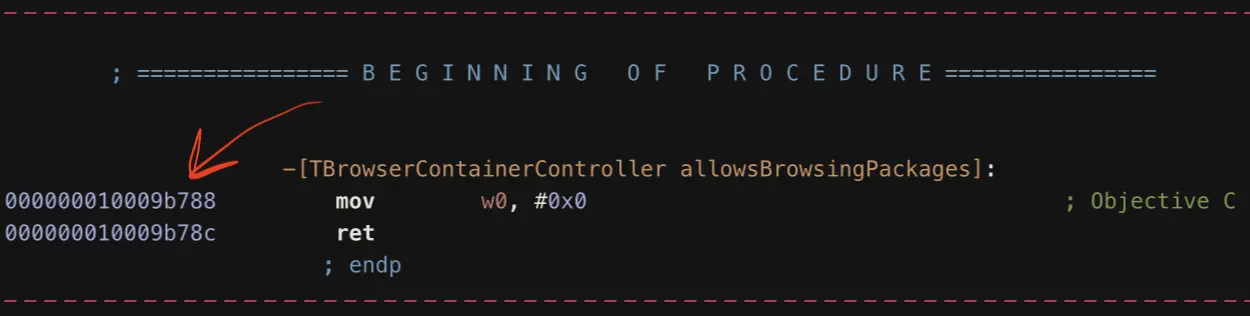
<p>The procedure that we are interested in starts at address <code class="language-plaintext highlighter-rouge">0x10009b788</code> (in different MacOS versions it might be different):</p>

<p><img src="/assets/1/load_address.png.webp" alt="load_address" /></p>

<p>Let’s set a breakpoint there:</p>

<div class="language-bash highlighter-rouge"><div class="highlight"><pre class="highlight"><code><span class="o">(</span>lldb<span class="o">)</span> breakpoint <span class="nb">set</span> <span class="nt">--shlib</span> Finder <span class="nt">--address</span> 0x10009b788
Breakpoint 1: where <span class="o">=</span> Finder<span class="sb">`</span>___lldb_unnamed_symbol2354<span class="nv">$$</span>Finder, address <span class="o">=</span> 0x0000000102f83788
</code></pre></div></div>

<p>Notice that the address <code class="language-plaintext highlighter-rouge">0x0000000102f83788</code> that the lldb outputs is different from the one we specified with <code class="language-plaintext highlighter-rouge">--address</code> due to ASLR. This is the <strong>actual slid</strong> address where the procedure is loaded and it will be different every time the Finder process is launched. Remember this address because it will be useful to us later.</p>

<p>Now click on <code class="language-plaintext highlighter-rouge">/Applications</code> in the Finder and it should freeze due to a breakpoint being hit in lldb. So how do we return <code class="language-plaintext highlighter-rouge">true</code> instead of <code class="language-plaintext highlighter-rouge">false</code>? Lldb has just the command for returning early from a call - <code class="language-plaintext highlighter-rouge">thread return</code>. Let’s use it returning 1 instead of 0:</p>

<div class="language-bash highlighter-rouge"><div class="highlight"><pre class="highlight"><code><span class="o">(</span>lldb<span class="o">)</span> thread <span class="k">return </span>1
<span class="o">(</span>lldb<span class="o">)</span> <span class="k">continue</span>
</code></pre></div></div>

<p>(you will have to repeat that for every package in the folder or <code class="language-plaintext highlighter-rouge">breakpoint disable</code>)</p>

<p>After the Finder execution continues you should finally be able to browse through any package as if it was a regular directory:</p>

<p><img src="/assets/1/xcode_package.png.webp" alt="xcode_package" /></p>

<p>So after all the <code class="language-plaintext highlighter-rouge">-[TBrowserContainerController allowsBrowsingPackages]</code> is indeed responsible for displaying packages as regular directories! But how can we <code class="language-plaintext highlighter-rouge">return 1</code> from this procedure without having to type commands in lldb after opening each directory in Finder?</p>

<h2 id="solutions-that-don-t-work">
<a href="#solutions-that-don-t-work" class="heading-link">
Solutions that don’t work
</a>
</h2>

<p>Unfortunately simply scripting the breakpoint using <code class="language-plaintext highlighter-rouge">--command 'thread return 1'</code> and <code class="language-plaintext highlighter-rouge">--auto-continue True</code> crashes Finder for some reason and it would probably impede Finder’s performance. Before macOS 12 a fine solution using swizzling worked perfectly:</p>

<div class="language-bash highlighter-rouge"><div class="highlight"><pre class="highlight"><code><span class="o">(</span>lldb<span class="o">)</span> expression <span class="nt">--language</span> swift <span class="nt">--</span>
Enter expressions, <span class="k">then </span>terminate with an empty line to evaluate:
  1: import Foundation
  2:
  3: extension NSObject <span class="o">{</span>
  4:   @objc func swizzled_allowsBrowsingPackages<span class="o">()</span> -&gt; Bool <span class="o">{</span> <span class="k">return </span><span class="nb">true</span> <span class="o">}</span>
  5: <span class="o">}</span>
  6:
  7: guard <span class="nb">let </span>originalMethod <span class="o">=</span> class_getInstanceMethod<span class="o">(</span>
  8:   NSClassFromString<span class="o">(</span><span class="s2">"TBrowserContainerController"</span><span class="o">)</span>,
  9:   Selector<span class="o">(</span><span class="s2">"allowsBrowsingPackages"</span><span class="o">)</span>
 10: <span class="o">)</span>, <span class="nb">let </span>swizzledMethod <span class="o">=</span> class_getInstanceMethod<span class="o">(</span>
 11:   NSObject.self,
 12:   Selector<span class="o">(</span><span class="s2">"swizzled_allowsBrowsingPackages"</span><span class="o">)</span>
 13: <span class="o">)</span> <span class="k">else</span> <span class="o">{</span> <span class="k">return</span> <span class="o">}</span>
 14:
 15: method_exchangeImplementations<span class="o">(</span>originalMethod, swizzledMethod<span class="o">)</span>
</code></pre></div></div>

<p>However, it also crashes at <code class="language-plaintext highlighter-rouge">method_exchangeImplementations</code> starting with Monterey.</p>

<p>That leaves us with the last reserve tool…</p>

<h2 id="manipulating-opcodes">
<a href="#manipulating-opcodes" class="heading-link">
Manipulating opcodes
</a>
</h2>

<p>Underneath, the code that the CPU executes is just a sequence of numbers and those numbers can be manipulated. Let’s use <code class="language-plaintext highlighter-rouge">memory read</code> to make sense of the ARM64 assembly and the underlying opcodes. We will need the slid address of the procedure that the lldb gave us when we set the breakpoint (use <code class="language-plaintext highlighter-rouge">breakpoint list</code> to see previously set breakpoints):</p>

<div class="language-bash highlighter-rouge"><div class="highlight"><pre class="highlight"><code><span class="o">(</span>lldb<span class="o">)</span> memory <span class="nb">read</span> <span class="nt">--format</span> instruction 0x0000000102acf788
    0x102acf788: 0x52800000   mov    w0, <span class="c">#0x0</span>
    0x102acf78c: 0xd65f03c0   ret
</code></pre></div></div>

<p>We can see that <code class="language-plaintext highlighter-rouge">mov w0, #0x0</code> is responsible for setting the output of the <code class="language-plaintext highlighter-rouge">allowsBrowsingPackages</code> method. So what would it take to turn <code class="language-plaintext highlighter-rouge">#0x0</code> into <code class="language-plaintext highlighter-rouge">#0x1</code>? To figure out we can disassemble a similar function:</p>

<div class="language-bash highlighter-rouge"><div class="highlight"><pre class="highlight"><code><span class="nv">$ </span><span class="nb">echo</span> <span class="s1">'int foo() { return 0; }'</span> | clang <span class="nt">-c</span> <span class="nt">-xc</span> <span class="nt">-o</span> /dev/stdout - | objdump <span class="nt">-d</span> /dev/stdin
</code></pre></div></div>

<p>the most important output here is the following sequence of bytes:</p>

<div class="language-plaintext highlighter-rouge"><div class="highlight"><pre class="highlight"><code>0: 00 00 80 52      mov w0, #0
4: c0 03 5f d6      ret
</code></pre></div></div>

<p>notice the output of <code class="language-plaintext highlighter-rouge">objdump</code> matches the disassembly from <code class="language-plaintext highlighter-rouge">lldb</code> perfectly, the only difference being that the disassembly from <code class="language-plaintext highlighter-rouge">lldb</code> is reversed due to endianness. Now, what happens if <code class="language-plaintext highlighter-rouge">return 0</code> is changed to <code class="language-plaintext highlighter-rouge">return 1</code>? We get the following disassembly:</p>

<div class="language-plaintext highlighter-rouge"><div class="highlight"><pre class="highlight"><code>0: 20 00 80 52      mov w0, #1
4: c0 03 5f d6      ret
</code></pre></div></div>

<p>The difference is that the first byte changed from <code class="language-plaintext highlighter-rouge">0x00</code> to <code class="language-plaintext highlighter-rouge">0x20</code>.</p>

<p>Now we can change the same byte in the Finder process and see what happens:</p>

<div class="language-bash highlighter-rouge"><div class="highlight"><pre class="highlight"><code><span class="o">(</span>lldb<span class="o">)</span> memory write 0x0000000102acf788 0x20
</code></pre></div></div>

<p>and if we read the instructions now, the assembly should change as expected:</p>

<div class="language-bash highlighter-rouge"><div class="highlight"><pre class="highlight"><code><span class="o">(</span>lldb<span class="o">)</span> memory <span class="nb">read</span> <span class="nt">--format</span> instruction 0x0000000102acf788
    0x102acf788: 0x52800020   mov    w0, <span class="c">#0x1</span>
    0x102acf78c: 0xd65f03c0   ret
</code></pre></div></div>

<p>Now we can finally unpause the Finder using <code class="language-plaintext highlighter-rouge">continue</code>.</p>

<p><img src="/assets/1/xcode_package_2.png.webp" alt="Untitled" /></p>

<p>Yay! We can now browse any package in the Finder without having to <code class="language-plaintext highlighter-rouge">Show Package Contents</code> every time (who cares about SIP anyways).</p>

<h2 id="in-the-future-episodes">
<a href="#in-the-future-episodes" class="heading-link">
In the future episodes...
</a>
</h2>

<p>While automating this solution I also had a chance to write some lldb python scripts and debug those scripts in PyCharm. In the next articles, I hope to cover those techniques as well.</p>

<p>Did you find any of the techniques used in this article useful? Do you have any questions or suggestions? Please let me know in the comments!</p>]]></content><author><name>Timofey Solonin</name><email>abdulowork@gmail.com</email></author><category term="lldb" /><category term="Finder" /><category term="Hopper" /><category term="assembly" /><summary type="html"><![CDATA[Do you want to never press Show Package Contents again? Or maybe you just want to learn a couple of practical lldb techniques? Either way, I invite you on the journey to discover a hidden feature within the Finder!]]></summary><media:thumbnail xmlns:media="http://search.yahoo.com/mrss/" url="https://abdulowork.github.io/assets/1/title.png" /><media:content medium="image" url="https://abdulowork.github.io/assets/1/title.png" xmlns:media="http://search.yahoo.com/mrss/" /></entry></feed>